liveBook · Manning

Max-width property

As explained in Design for Developers

Max-width is a constraint specifying the greatest horizontal size an element or layout container may occupy.

Max-width sets the greatest horizontal size of a website container. It creates an outer boundary that keeps content from extending beyond the grid. section 6.2.2

Use max-width as an early layout decision:

  • Choose the container width before defining grid columns. section 6.2.2
  • Treat common desktop values such as 960px or 1200px as starting points, not universal rules. section 6.2.2 section 10.3
  • Align components to the grid even when individual sections use different widths. section 10.3

A 12-column travel website grid

A larger-screen layout uses a 1220px max-width, 16px gutters, and twelve 87px columns. The search bar, benefit cards, and carousel can occupy different column spans while remaining aligned to the same container. section 10.3

Figure 6.6 This grid has a maximum width of 1200 pixels with a margin of 22 pixels on the left and right; columns are 127 pixels wide, and the remaining grid gaps between columns are 20 pixels.
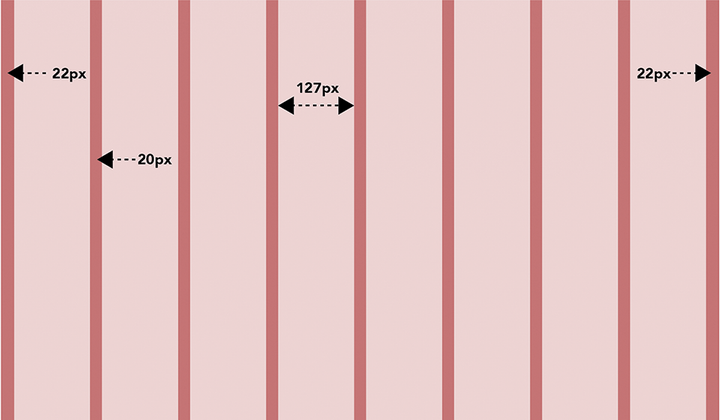
Inspect a concrete 1200px grid showing container width, side margins, column widths, and gaps. section 6.2.2


How Design for Developers covers it

How deep it goes
Defines container decisions and grid examples, but stops short of property syntax and responsive implementation rules.
Examples
Uses 960px, 1200px, and 1220px containers, including a 1200px eight-column grid and a 1220px twelve-column layout.
What it assumes
Builds from deciding container width, columns, gutters, and margins as the basic parts of a website grid.
What you can do after
Apply it via CSS Grid by choosing a container width and aligning varied content to its columns.
How it connects
Connects max-width to CSS Grid, columns, gutters, margins, wireframes, and device-targeted layout decisions.

Also explained in

Compare how 5 books explain max-width property →

Related concepts

This explainer was generated by Manning's knowledge graph from the text of Design for Developers. The section links point to the parts of the book it draws on.


