Readability is how easily people can read and understand written content. On a website or application, readable text helps people scan for information without strain; poor typography or contrast can make them leave. Treat it as a usability and accessibility concern, not a decorative finishing touch. section 8.2.6 section 2.1.4
Make body text easier to read by choosing and testing its visual conditions:
- Use a readable, legible typeface at its intended size. Reserve decorative fonts for short display use, not long body copy. section 8.2.1
- Keep paragraph lines roughly 45–70 characters long. Narrower lines support scanning; overly long lines make sustained focus harder. section 8.2.6
- Give text sufficient line height, and make letter-spacing adjustments small and purposeful. Excessive spacing in either direction impairs reading. section 8.2.6 section 8.3
- Provide strong text-to-background contrast, especially in typography and form elements; do not rely on pale colors or thin white text over busy images. section 2.1.4 section 9.9
Text placed over an image
White text over a light or busy photograph is difficult to read. Choose a darker, calmer image; add a dark gradient treatment; or place text on a solid-color shape and check the resulting color contrast. A solid background is the simplest way to make the text reliably readable. section 10.6.2 section 2.1.4
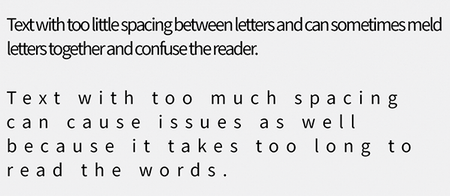
Compare overly loose and overly tight letter spacing to see why small, tested adjustments matter more than forcing text to fill a line. section 8.2.6
Readability also depends on the relationship between type and layout. For example, a 16px paragraph with a 1.25 line-height produces 20px line spacing; heading line height can be tighter when headings contain little text. Adjust spacing in concert with line length and test the result with people and lower-resolution devices. section 10.5 section 8.2.1










