Readability is how easily people can visually recognize and understand text. In a data visualization, type is supporting cast: it should be legible enough to guide the story without becoming the loudest thing on the stage. Text that is too light, heavy, cramped, loose, tiny, oversized, low-contrast, or overly decorative makes readers work harder than the data deserves. section 5.2
Small labels, annotations, captions, and axis text need particular care. Choose a regular weight for most small text: thin faces can fade away, while very heavy ones crowd out white space and strain the eye. Reserve heavier weights for necessary emphasis and larger headings. section 5.2.1
For readable type, favor visual breathing room and easily recognized letterforms:
- Use fonts with generous white space, including a substantial x-height and rounded counters, the enclosed or partly enclosed spaces within letters. section 5.2.1 section 5.6
- Make commonly confused characters visibly distinct, especially lowercase l, numeral 1, and uppercase I. section 5.2.1 section 5.6
- Keep line lengths manageable and leave room between lines and paragraphs so readers can track where to look next. section 5.5.1
- Avoid full justification when it creates distracting rivers of white space or compresses words too tightly. section 5.5.1
- Begin with one font, size, and color; add only modest contrast when hierarchy genuinely needs it. section 5.2.3
The one-font baseline
A clean chart can use one font at one size throughout, with white space separating elements. If the title needs more presence, make it bold or use a subtly contrasting related style. Smaller annotation text can still register when its difference is purposeful rather than decorative. section 5.2.3
Figure 5.8 Three fonts with different weights applied to a paragraph of text (the prologue of William Shakespeare’s Romeo and Juliet, public domain)
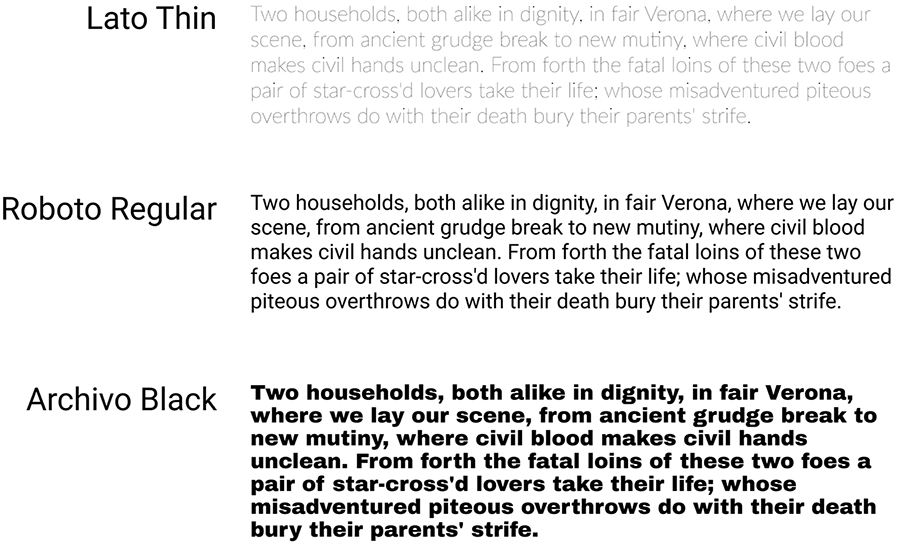
Compare equal-size paragraph text in thin, regular, and heavy weights to see why readable small text needs a balance of ink and white space. section 5.2.1
Readability also supports inclusion. Loose character and line spacing plus shorter lines help readers with dyslexia and improve reading for others. WCAG guidance treats spacing and reflow as accessibility concerns; typography should remain usable when people apply their own spacing preferences. section 5.5.1 section 5.5.2
Readable emphasis in a tooltip
Tooltips can use a slightly larger default size to create a zoomed-in reading effect while keeping the same typeface and color as the surrounding display. Add emphasis only where it is needed, using a modestly heavier weight rather than changing everything. section 8.4.3










