liveBook · Manning

Web Design Playground

As explained in Web Design Playground

The companion website associated with the book for practicing its lessons and experimenting with the examples.

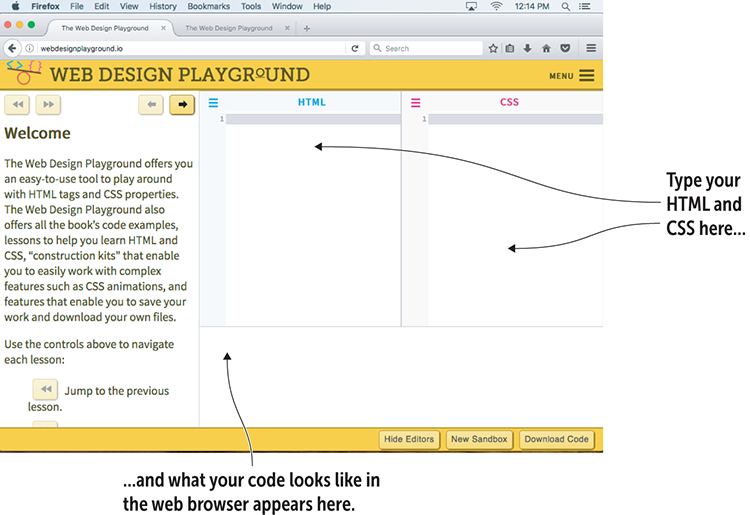
Web Design Playground is an online workspace for trying HTML tags and CSS properties without much setup. Type code, change values, and see the result in a browser-like preview. Saving work and downloading the resulting file make experiments easy to keep and reuse. section 1.10 section 1.11

A basic experiment follows three small steps:

  • Enter the HTML tags you want to try in the HTML Editor, including required attributes. section 1.11
  • Enter CSS property definitions in the CSS Editor. section 1.11
  • Inspect the Results box, then revise the code or experiment with different values. section 1.11

Start with a basic page

Use the Playground's ready-made basic page structure as a starting point. It includes the HTML5 declaration, the html container, head and body sections, page metadata, a title, and a style area; the Playground hides this setup while you work. You can also copy and paste the structure for a new project. section 2.2
01_05.png

Use the interface illustration to orient yourself before entering HTML and CSS. section 1.10

How Web Design Playground covers it

How deep it goes
Demonstrates an editor-preview-revision workflow and supporting features, while hiding basic page boilerplate.
Examples
Uses HTML and CSS experiments, loaded example files, lessons, construction kits, saved work, and downloadable files.
What it assumes
Starts from trying HTML tags and CSS properties, while providing the basic page structure behind the scenes.
What you can do after
Apply HTML and CSS via the Playground, inspect rendered results, revise problems, save experiments, and download finished files.
How it connects
Connects HTML tags and attributes with CSS properties, web browsers, HTML5 page structure, lessons, and example files.

Related concepts

This explainer was generated by Manning's knowledge graph from the text of Web Design Playground. The section links point to the parts of the book it draws on.