An MCP prompt is a predefined template for standardizing how an agent interacts with a complex workflow or with specialized tools and resources exposed by an MCP server. section 3.1.3
The key distinction is control: tools are model-controlled, while prompts are typically user-controlled or application-controlled. A user or client selects a prompt and hands the resulting interaction to the agent. section 3.1.3
Place prompts alongside the other MCP capability primitives:
- Tools perform external actions and are invoked by the agent during a conversation. section 3.1.3
- Resources provide data such as files, configurations, databases, or other external entities for the agent to consume. section 3.1.3
- Prompts provide reusable templates for common interactions with workflows, tools, or resources. section 3.6
A client-selected workflow
A client such as Claude Desktop or Cursor can surface available prompt templates for a user to select. The selected template standardizes the interaction, while the agent can use the specialized tools and resources behind the MCP server. Wrapping prompt functionality inside a tool may help clients that support only tools, but it remains a workaround rather than an equivalent primitive. section 3.1.3
Figure 3.5 The main components of an MCP server include prompts, specialized system instructions, resources (used for access to files), configuration, databases, and tools, which are extensions of an internal agent’s ability to consume and use tools.
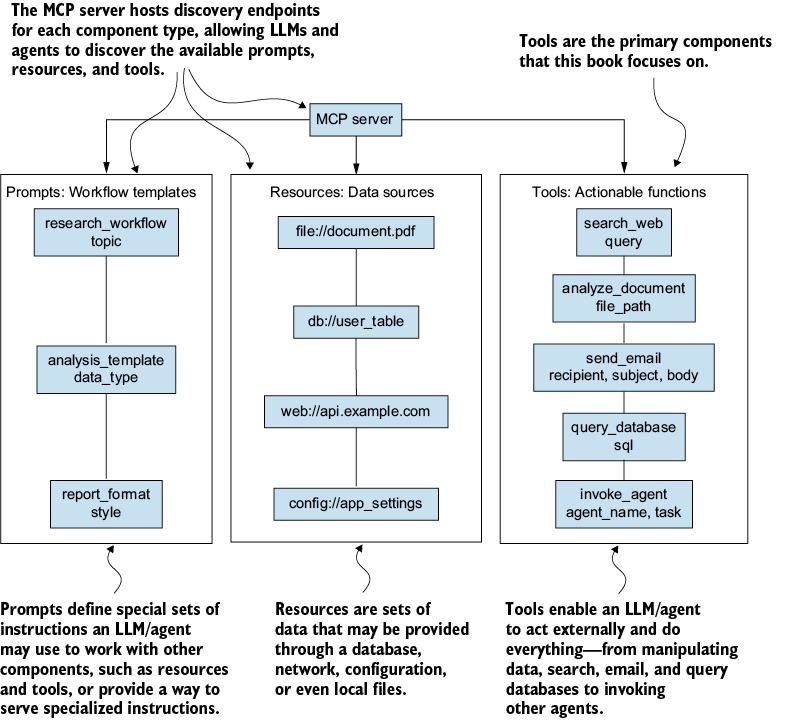
Use the component diagram to distinguish prompts from specialized system instructions, resources, configuration, databases, and tools within an MCP server. section 3.1.3
