An MCP resource is uniquely identified data or content that an MCP server exposes for clients or agents to fetch and use. Resources provide preloaded context or reference material alongside tools and prompts, forming a modular interface between AI applications and external systems. section 12.4 section 12.8
Design and operate resources around four implementation concerns:
- Register every resource with a unique identifier and URI so clients can discover and fetch it reliably. section 12.4.2
- Expose resources through an MCP server; an MCP client or agent discovers them and incorporates structured responses into an application or model workflow. section 12.4 section 12.2
- Keep responses structured, predictable, and separated from direct AI access to external APIs. section 12.4.2 section 12.8
- Apply normal server practices, including access control, API-key management, monitoring, reliable uptime, and graceful failure handling. section 12.4.2 section 12.8
Inspecting resources locally
Run an MCP server locally and open MCP Inspector to explore its available resources, prompts, and tools in real time. The Inspector supports debugging and experimentation before an application consumes the server. section 12.4
Figure 12.5 MCP server building blocks and how they interact with clients and external services
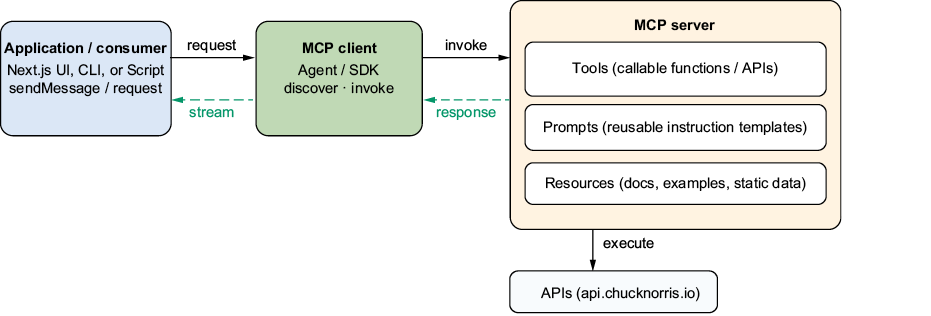
Use the architecture figure to trace how an application communicates through an MCP client with servers, resources, tools, prompts, and external services. section 12.4



