liveBook · Manning

Medium-fidelity wireframe

As explained in Design for Developers

A digitally created wireframe with moderately accurate spacing, layout, sizing, and component representation but without pixel-level specificity.

A medium-fidelity wireframe is a digitally created interface plan with more accurate spacing, layout, sizing, and component representation than a low-fidelity wireframe, without pixel-level specificity. section 5.3.1

Use it to communicate structure and hierarchy before committing to final visual design:

  • Create it in Figma, Balsamiq, or Axure RP for more precise layout and component decisions. section 5.3.1
  • Apply typographic weights and grayscale contrast to show content hierarchy and emphasize important components. section 5.3.1
  • Use placeholder image shapes, optional line drawings, icons, real navigation and headings, and filler paragraph text. section 5.3.1
Figure 5.8 An example of the top part of a wireframe that defines a site’s structure. This wireframe focuses on the hero section of a home page and the content immediately below it.
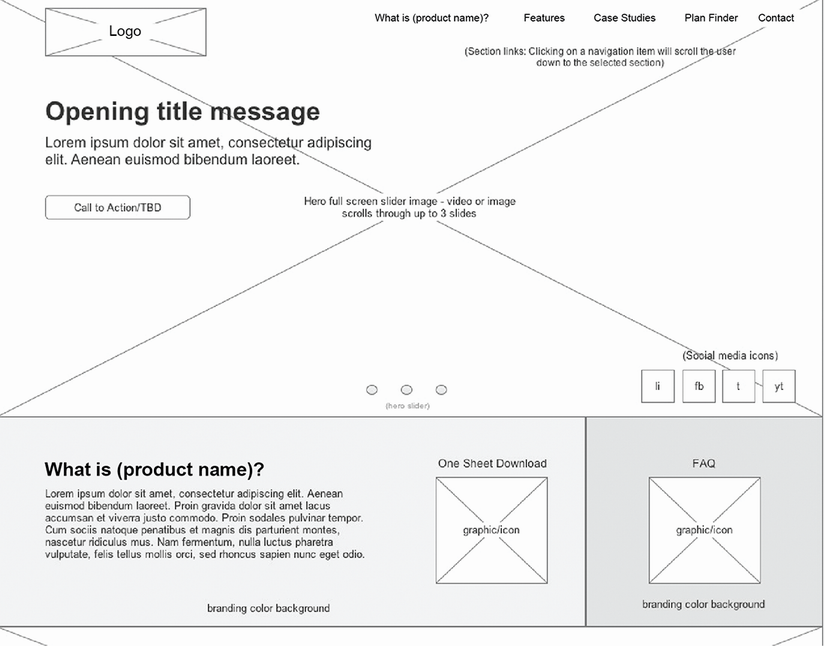
Inspect a wireframe example focused on a home page’s hero section and the content immediately below it. section 5.3.1

How Design for Developers covers it

How deep it goes
Defines spacing, layout, sizing, components, hierarchy, and placeholders, but stops short of pixel-specific representation.
Examples
Uses hero sections, navigation, headings, calls to action, placeholder images, icons, grayscale shades, and filler text.
What you can do after
Build medium-fidelity wireframes with Figma, Balsamiq, or Axure RP to represent interface structure and hierarchy.
How it connects
Connects low-fidelity wireframes, high-fidelity wireframes, typography, contrast, and content hierarchy.

Related concepts

This explainer was generated by Manning's knowledge graph from the text of Design for Developers. The section links point to the parts of the book it draws on.