Memory usage is the runtime memory occupied or allocated by a process or its components. Investigating it helps explain slowdowns, freezes, allocation pressure, and eventual application failure. section 5.2.2 section 9.3
Start with a high-level observation, then narrow the cause. VisualVM’s Monitor tab reveals abnormal memory consumption and GC activity; memory sampling shows which object types and instance counts occupy the most space. section 5.2.2 section 9.1
Use these diagnostic questions:
- Does memory rise steadily, suggesting retained objects and a possible memory leak, or form peaks and valleys as GC reclaims memory? section 9.3 section 11.4.3
- Do many instances consume memory, or do a few large instances fill the heap? section 9.1
- Does frequent GC, especially full GC, indicate insufficient heap capacity rather than a leak? section 11.4.3
Sampling a memory-heavy endpoint
Call the endpoint, select VisualVM’s Sampler tab, start memory sampling, and sort results by occupied memory and instance count. A Product type from the application code may stand out among primitives, strings, arrays, and JDK objects. A few large video files would represent the alternative pattern: reduce memory pressure by processing fragments instead of complete files. section 9.1
Figure 9.1 The memory widget in the Monitor tab in VisualVM helps to identify whether the app spends more memory than usual at any given time. Often, widgets in the Monitor tab, such as CPU and memory consumption, give us clues on how to continue our investigation. When we see that the app consumes an abnormal amount of memory, we may decide to continue with memory profiling the execution.
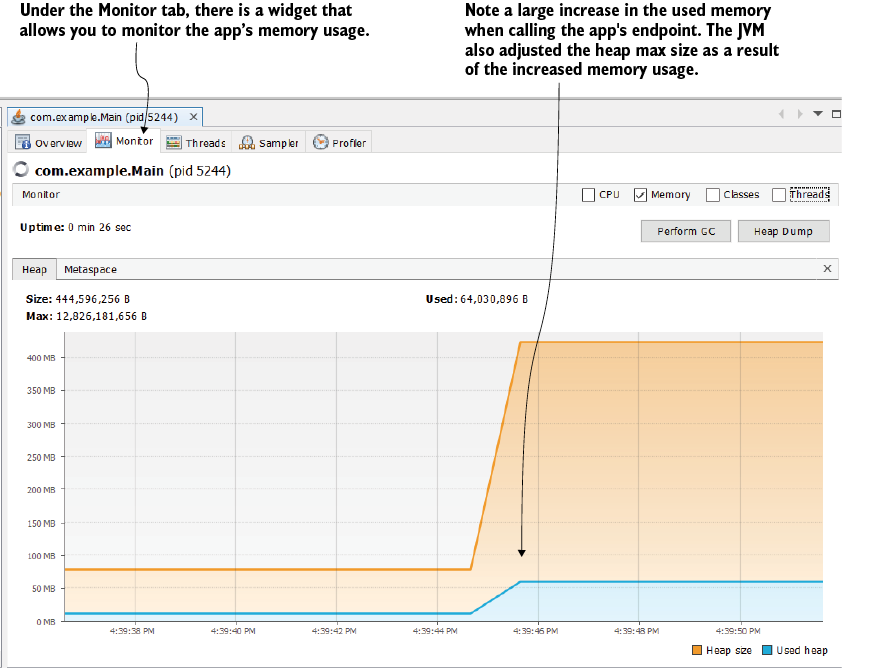
Use the memory widget to identify abnormal consumption and decide whether deeper profiling is warranted. section 9.1
[GC pause (G1 Evacuation Pause) (mixed), 0.01506789 secs]
[GC pause (G1 Evacuation Pause) (mixed), 0.01783456 secs]
[GC pause (G1 Evacuation Pause) (mixed), 0.02021234 secs]

[Full GC (Allocation Failure) 8192M->6100M(8192M), 2.345678 secs]
[GC pause (G1 Evacuation Pause) (mixed), 0.01901234 secs]
[GC pause (G1 Evacuation Pause) (mixed), 0.02115678 secs]

[Full GC (Allocation Failure) 8192M->5800M(8192M), 2.678901 secs]
[GC pause (G1 Evacuation Pause) (mixed), 0.0987654 secs]
[GC pause (G1 Evacuation Pause) (mixed), 0.02254321 secs]

[Full GC (Allocation Failure) 8192M->5600M(8192M), 2.789012 secs]
Compare repeated full GC events with reclaimed heap values to recognize insufficient memory and its performance cost. section 11.4.3






