A MERGE statement conditionally inserts, updates, or deletes rows by comparing source records with a target table. In a Snowflake pipeline, it consolidates staged data while preserving one current record for each defined business key. section 2.3.2
Build a MERGE around these elements:
- Name the destination with MERGE INTO and identify incoming records with USING. section 2.3.2
- Define uniqueness in the ON clause, using the customer, delivery date, and baked good type in the bakery pipeline. section 2.3.2
- Update matched rows with newer source values and insert unmatched rows into the target. section 2.3.2
Merging staged bakery orders
MERGE INTO CUSTOMER_ORDERS tgt USING ORDERS_STG AS src ON src.customer = tgt.customer AND src.delivery_date = tgt.delivery_date AND src.baked_good_type = tgt.baked_good_type WHEN MATCHED THEN UPDATE SET tgt.quantity = src.quantity, tgt.source_file_name = src.source_file_name, tgt.load_ts = CURRENT_TIMESTAMP() WHEN NOT MATCHED THEN INSERT (...); This keeps at most one row for each customer, baked good, and delivery date while retaining the latest quantity. section 2.3.2
Figure 2.1 Data pipeline that takes CSV files from a Snowflake internal stage, loads the data into a staging table, merges the data from the staging table into the target table, and transforms the data for downstream consumption
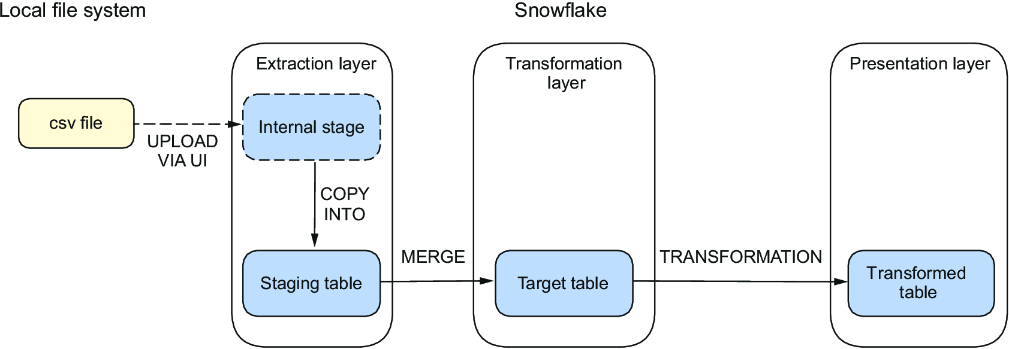
Trace MERGE within the pipeline from a staged CSV file through the staging table, target table, and downstream transformation. section 2.0
