A target table receives data loaded or transformed during a data pipeline. In Snowflake, it sits between a staging table and downstream transformations or consumers, and is typically designed as part of the transformation-layer data model. section 2.0 section 1.3
Use a target table to:
- Store historical records accumulated from incoming files rather than only the latest staged batch. section 2.3.2
- Apply INSERT or MERGE loading logic, selecting MERGE when incoming records can replace existing records. section 2.3.2 section 1.3
- Provide a stable table for subsequent SQL transformations, reporting structures, or downstream consumers. section 2.0 section 1.3
Merging bakery orders
Create CUSTOMER_ORDERS with customer, order, delivery, product, quantity, source-file, and load-timestamp columns. Merge ORDERS_STG into it using customer, delivery date, and baked-good type as the uniqueness key. Update matching rows with revised quantities and insert unmatched rows, preserving no more than one row per key. section 2.3.2
Figure 2.1 Data pipeline that takes CSV files from a Snowflake internal stage, loads the data into a staging table, merges the data from the staging table into the target table, and transforms the data for downstream consumption
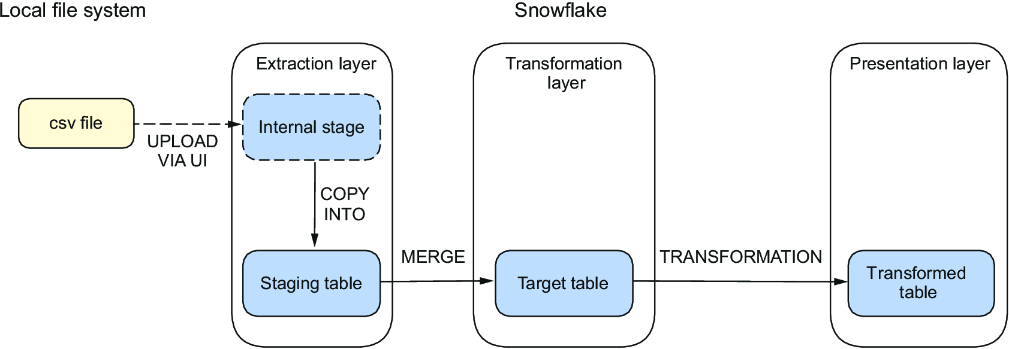
Trace the pipeline from a staged CSV file through the staging table and target table to downstream transformations. section 2.0
