A Snowflake stream is a change-data-capture object for incremental pipelines. It tracks inserts, updates, and deletes on an underlying object between consumption points, letting downstream processing handle changed data instead of reprocessing everything. section 1.2.1 section 12.3
A stream can be created on a standard table, external table, view’s underlying tables, or directory table. Creation establishes a snapshot; later DML changes are reflected in the stream. The stream stores change-tracking metadata rather than its own copy of table data. section 12.3
Stream records expose metadata that identifies the net change:
- METADATA$ACTION is INSERT or DELETE. An update appears as a DELETE for the previous row version and an INSERT for the new version. section 12.3
- METADATA$ISUPDATE flags whether an INSERT or DELETE belongs to an update operation, and METADATA$ROW_ID identifies the row. section 12.3
- Multiple changes to one row collapse to the difference between the earlier and current table versions; intermediate changes are not retained. section 12.3
Query a stream with SELECT to inspect changes since creation or its last consumption. A stream is consumed when a transaction writes its data to one or more target tables; after commit, it is empty and begins accumulating subsequent changes. section 12.3
Incrementally flatten newly loaded JSON orders
Create a stream on an extraction table after loading JSON files, then insert from the stream into a staging table while flattening the JSON. Unlike a staging view that processes all source data, this path inserts only rows from newly arrived files. The role, warehouse, database, extraction table, stream, and target table are configured before the incremental insert. section 12.3.1
Figure 12.2 Two ways to ingest data into the staging layer. The first option represents full ingestion implemented as a view in the staging layer; the second option uses a Snowflake stream to detect changes and inserts only changed data into the staging table.
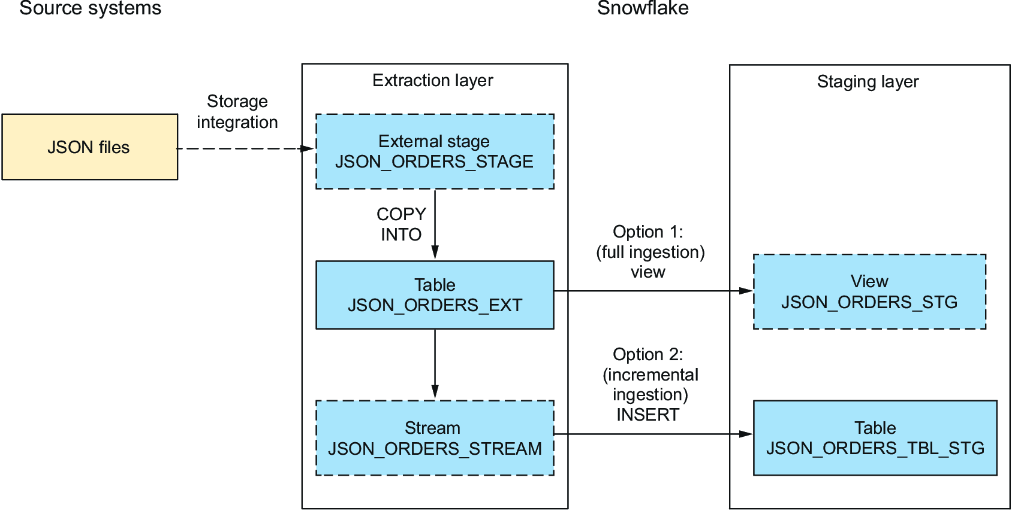
Compare full ingestion through a staging view with stream-based ingestion that detects changes and inserts only changed data into a staging table. section 12.3.1
Streams fit pipelines that need lower processing volume: incremental ingestion moves less data, reduces warehouse processing time and credit use, and reduces intermediate-layer storage. For scheduled processing, tasks can use SYSTEM$STREAM_HAS_DATA so they run only when a stream indicates new or changed data. section 12.0 section 13.6
