Incremental data ingestion copies only records that are new or changed since the previous pipeline run, rather than reloading an entire source. A first run commonly performs full ingestion so the warehouse has its historical baseline; later scheduled runs apply detected changes to keep it synchronized. This reduces processed volume, warehouse time, credits, storage, and intermediate-layer data, especially for large operational datasets. section 12.1 section 12.0
Choose the ingestion design according to data volume, history requirements, and operational risk:
- Use full ingestion when volumes are low and history is unnecessary. Replacing a view or truncating and reloading a table is simple, but repeatedly processes unchanged data and can erase deleted source records from the warehouse. section 12.1.1 section 12.5
- Use incremental ingestion for regular processing of larger datasets. Identify additions, updates, and deletions since the last run, then append, update, or merge them into targets. section 12.1.2 section 1.2.1
- Preserve deletions as a changed status or validity flag when warehouse history matters. Use slowly changing dimensions or an append-only design when retaining prior values is required. section 12.1.2 section 12.5
- Design runs to be idempotent: repeated execution should produce no duplicates, gaps, or inconsistencies. Incremental logic is more complex than reloads and requires care around failed executions and consistency. section 12.1.2 section 12.5
Change detection may come from source timestamps, database change tracking, or another source-specific method agreed with system owners. In Snowflake, a stream can track DML changes on standard tables, external tables, view source tables, or directory tables. It records the difference from its creation or last consumption point, with metadata for action, update status, and row identity. Updates appear as a delete of the previous row and an insert of the new row. A committed transaction that writes stream data to target tables consumes the stream and begins a new accumulation interval. section 1.2.1 section 12.3
Incremental JSON order staging
For JSON order files arriving in cloud storage, load files into an extraction table, then create a stream on that table. Replace a staging view—which processes all available data—with a staging table populated from the stream. Flatten only the streamed JSON records and insert their customer, order, delivery, product, quantity, file-name, and load-time fields into staging. After the insert commits, the stream is empty until newly loaded files create further changes. section 12.3.1 section 12.3
Figure 12.2 Two ways to ingest data into the staging layer. The first option represents full ingestion implemented as a view in the staging layer; the second option uses a Snowflake stream to detect changes and inserts only changed data into the staging table.
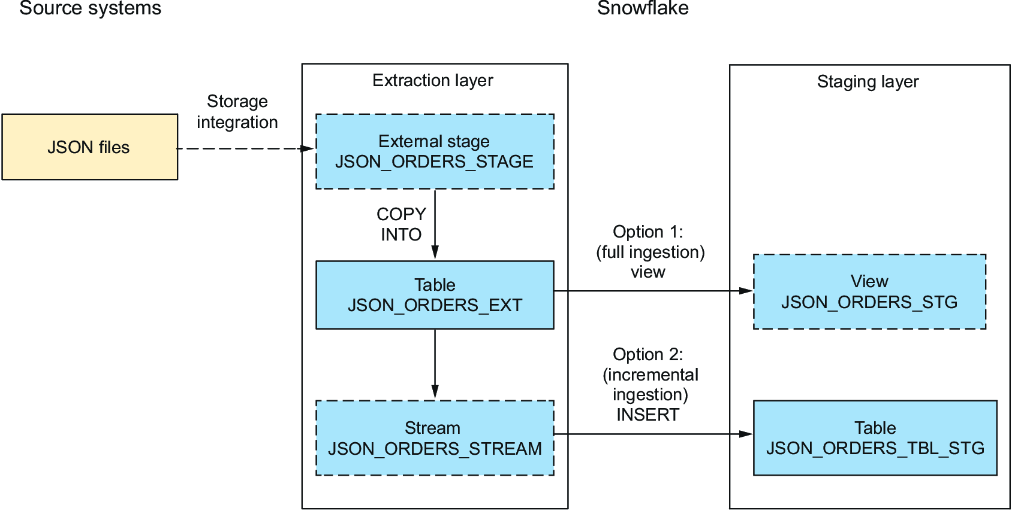
Compare a view-based staging path that processes all data with a stream-and-table path that inserts only changed records. section 12.3.1
