A dynamic table materializes the result of a defining query and lets Snowflake maintain it in the background. It is a building block for declarative transformation pipelines: define the result wanted rather than loading a target table with INSERT or MERGE operations and scheduled tasks. section 5.4 section 12.4
Create one with a name, a query, TARGET_LAG, and a virtual WAREHOUSE. TARGET_LAG sets the maximum acceptable delay behind queried tables; the warehouse supplies refresh compute. The initial refresh materializes the query result, and later source changes update the table. section 5.4 section 12.4
Flatten continuously ingested orders
A pipeline can use Snowpipe to load JSON files into a staging table, then use a dynamic table to flatten item arrays into relational order rows. This replaces a separately populated target table where continuously fresh order data is required. section 5.0 section 5.3.5
Figure 5.1 Data pipeline that continuously ingests data from JSON files in external cloud storage with Snowpipe. A storage integration object exposes the files in an external stage. A notification integration object configured with cloud messaging notifies Snowpipe when new files arrive so they can be ingested into the staging table with minimum delay. The JSON data in the staging table is flattened and materialized by a dynamic table.
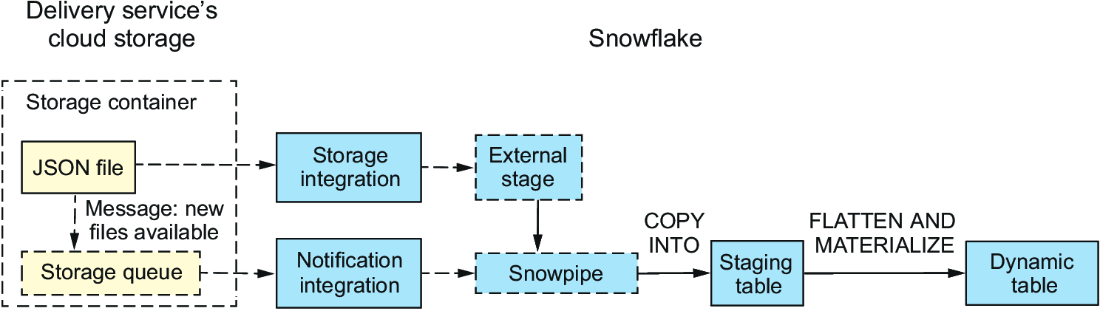
The pipeline diagram places the dynamic table after Snowpipe ingestion: JSON reaches a staging table, then is flattened and materialized for downstream use. section 5.0
Use dynamic tables when the pipeline benefits from declarative, lag-based refresh:
- Materialize a query that joins multiple tables, including normalized warehouse data. section 12.4 section 12.4.1
- Build sequential transformation steps, such as normalized orders followed by aggregated order summaries. section 12.4.1 section 12.4.2
- Avoid creating, consuming, and scheduling streams when automatic change tracking and target-lag refresh are acceptable. section 12.4 section 12.4.1
Dynamic tables are more flexible than materialized views for query types, including multi-table joins, but they cannot use stored procedures, nondeterministic functions, external functions, queries reading external tables, or materialized views. Do not choose them when every table must refresh on a controlled schedule and represent one consistent point in time; use streams or another scheduled incremental approach instead. section 5.4 section 12.4.1
Normalize and summarize incrementally
Define ORDERS_TBL with a query joining staged orders to PRODUCT and PARTNER tables, then define a summary dynamic table that groups quantities by delivery date, product, and category. When historical product data is involved, filter the validity timeline before summarizing to avoid duplicate category results. section 12.4 section 12.4.2
