A metadata filter restricts retrieval to documents or chunks whose attached metadata matches chosen criteria. For example, a travel chatbot can search only chunks tagged with destination Newquay, region Cornwall, or a selected source. The filtered set can then receive semantic search, combining sparse metadata matching with dense similarity. section 10.2
Build metadata filtering in three stages:
- Enrich chunks during ingestion with fields such as source, destination, and region. Split documents first, then preserve the metadata when adding chunks to ChromaDB. section 10.2.1
- Apply an explicit filter when the interface already supplies a selection, such as destination: Newquay. This is direct and predictable, but requires creating or updating the retriever parameters. section 10.2.2
- Infer filters from natural-language questions with SelfQueryRetriever or an LLM function call. Self-querying reduces manual wiring but adds LLM cost and latency; structured calls provide more flexibility but require more setup. section 10.2 section 10.2.2
Filtering a Newquay search
Store each chunk with destination="Newquay" and region="Cornwall". A manual retriever can apply destination="Newquay" to return only matching chunks. A structured LLM query can instead extract content_search="events festivals", destination="Newquay", and region="Cornwall", then translate both metadata comparisons into a ChromaDB filter joined with AND. section 10.2.2
Figure 10.1 Self-querying workflow. The original question turns into a semantic query with an embedded metadata filter. When this enriched query runs on the vector store, it first selects chunks matching the metadata filter and then applies semantic search on this refined set.
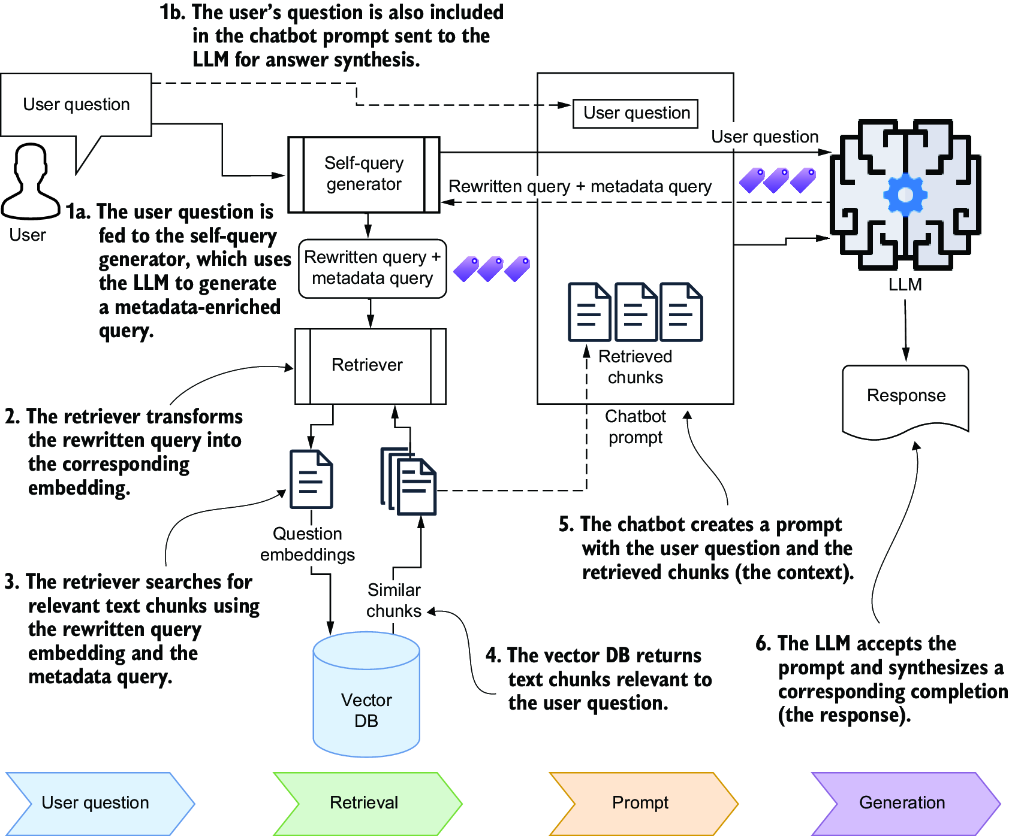
Shows the retrieval flow from an original question to an enriched semantic query containing a metadata filter, followed by search over the matching chunks. section 10.2

