liveBook · Manning

Microsoft Entra ID sign-in log

As explained in Azure Security

A Microsoft Entra ID dataset containing records of identities signing in to access resources and applications.

Microsoft Entra ID sign-in logs record how identities access resources and applications. They complement audit logs: audit logs show tenant tasks, while sign-in logs help identify who performed them. section 9.1.1

Use the dataset to distinguish sign-in activity by identity and authentication context:

  • Interactive user sign-ins record users entering credentials or completing an authentication challenge, such as multifactor authentication. section 9.1.1
  • Noninteractive user sign-ins record clients acting for users without requiring them to enter credentials. section 9.1.1
  • Service principal sign-ins record applications or service principals signing in without user involvement. section 9.1.1
  • Managed identity sign-ins record Azure services authenticating with secrets managed by Azure. section 9.1.1

Investigating a conditional access decision

When Bob signs in with credentials, inspect the interactive user sign-ins to determine his sign-in location and whether the conditional access policy applied to his identity. Access requires an appropriate Reader role, such as Security Reader or Reports Reader. section 9.1.1

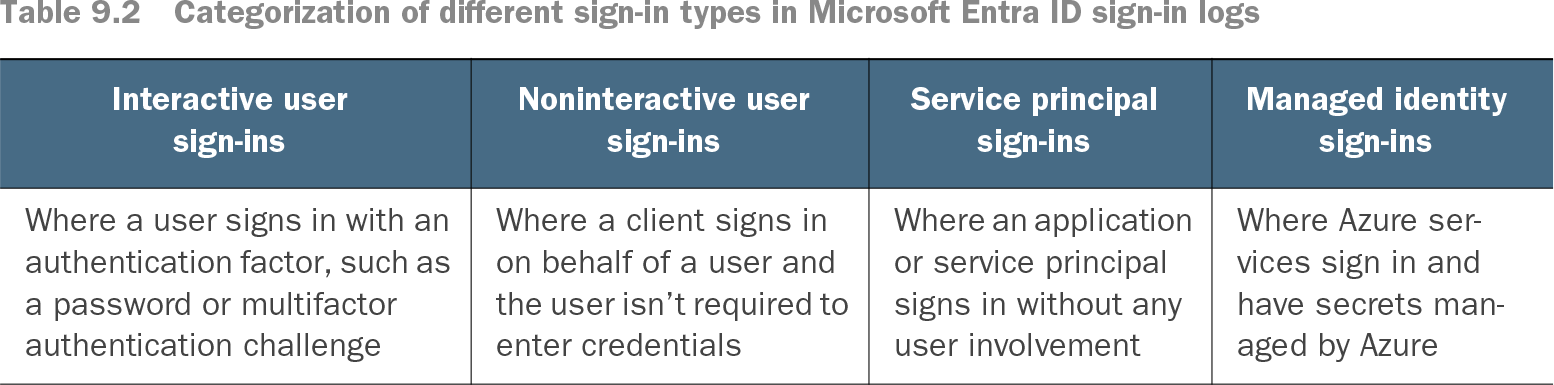
Table 9.2 Categorization of different sign-in types in Microsoft Entra ID sign-in logs (view table figure)

Interactive user sign-ins

Noninteractive user sign-ins

Service principalsign-ins

Managed identity sign-ins

Where a user signs in with an authentication factor, such as a password or multifactor authentication challenge

Where a client signs in on behalf of a user and the user isn’t required to enter credentials

Where an application or service principal signs in without any user involvement

Where Azure services sign in and have secrets managed by Azure

Browse the sign-in categories and their distinguishing authentication behaviors. section 9.1.1

How Azure Security covers it

How deep it goes
Defines four sign-in categories and demonstrates location and conditional-access investigation, but does not detail query syntax.
Examples
Uses Bob’s interactive sign-in to inspect location and conditional-access application across identity categories.
What it assumes
Assumes familiarity with Microsoft Entra ID audit logs and requires a Reader role for portal access.
What you can do after
Diagnose identity access by classifying sign-ins and checking location or conditional-access results.
How it connects
Connects Microsoft Entra ID audit logs, conditional access policies, authentication factors, service principals, and managed identities.

Related concepts

This explainer was generated by Manning's knowledge graph from the text of Azure Security. The section links point to the parts of the book it draws on.