Midjourney is a general-purpose text-to-image AI service. It can turn a plain-language prompt into original visual concepts, making it useful when a website needs design inspiration before its layout, colors, and imagery are finalized. Its results can be striking, but they work best as ideas to evaluate and refine rather than as replacements for design judgment. section 1.2.1 section 13.1.1
For website planning, ask for a specific kind of page, then add visual constraints. A prompt can name the subject and mood, specify colors and their relative importance, request details such as resolution or interface design, exclude unwanted colors, and set an aspect ratio. Midjourney returns four images per prompt, providing several directions to compare. section 4.3.2
Prompting a recipe-site homepage
Try: “sunny, bright, beautiful home page for an instant pot recipes website, brown::2 yellow::1 4K, detailed, masterpiece, ux, ui, --no blue --no orange --ar 3:2 --q 2.” Here, brown::2 yellow::1 asks for brown to be twice as prominent as yellow. The --no instruction excludes blue and orange; --ar 3:2 sets the aspect ratio; 4K, ux, ui, and --q 2 add quality and interface-oriented directions. section 4.3.2
Refine a promising direction in short cycles:
- Compare the four outputs for useful color combinations, typography, balance, composition, and placement ideas. section 4.3.2
- Rerun the prompt or change one detail, such as reversing brown::2 yellow::1 to brown::1 yellow::2. section 4.3.2
- Remove an unwanted element with --no, then generate again. section 4.3.2
- Upscale the strongest image, then use Vary, Zoom, or remixing to develop it further. section 4.3.2
- Simplify ideas that feel crowded or contain distracting details before carrying them into the final page design. section 4.3.2
Figure 4.3 Aside from some strange vegetation, this is a design that can work nicely as our home page.
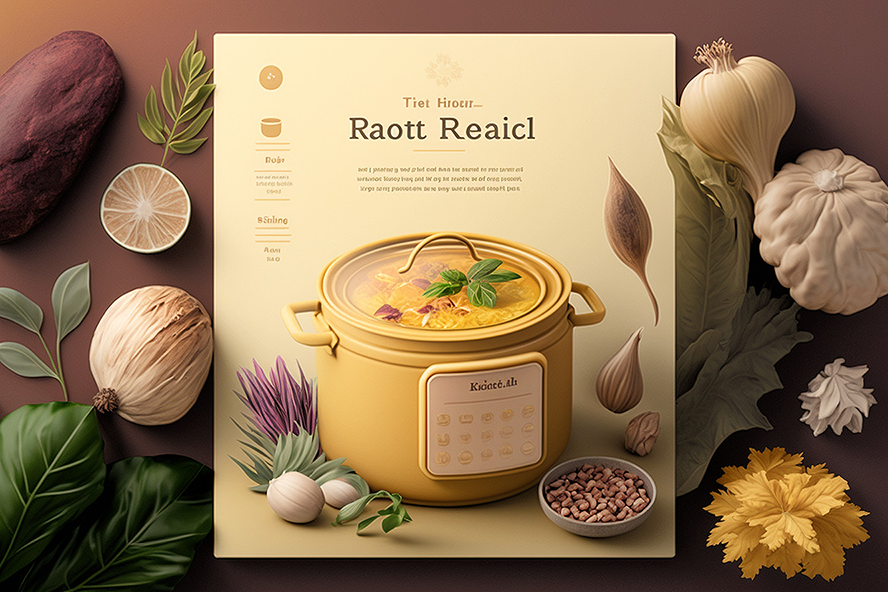
This homepage concept illustrates how an AI-generated image can serve as a starting point while still needing human review for unusual or impractical details. section 4.3.2
Treat generated visuals as a conversation: give direction, inspect what comes back, and adjust the prompt until a design stands out. AI-generated art can still produce strange imagery or meaningless text, so check outputs carefully and retain only the ideas that improve the finished site. section 4.3.2 section 1.7
