Mixed precision assigns different numerical formats to different parts of a computation. Low precision reduces memory use and can accelerate large matrix multiplications; higher precision protects values and operations sensitive to small errors. The speed benefit depends on hardware support for the chosen format. section 5.6.1
In DeepSeek’s FP8 training framework, BF16 input activations and master weights held in FP32 or BF16 are converted on the fly to FP8 for linear-layer multiplication. Sensitive components, including master weights and optimizer states, remain in higher precision. FP8 matrix multiplication requires capable hardware, such as NVIDIA Hopper or Blackwell Tensor Cores. section 5.6.1 section 5.7
Figure 5.22 The mixed-precision framework with FP8 data format in the Linear operator. The diagram illustrates the flow of data through a linear layer, showing how inputs and weights are converted to low-precision FP8 for fast computation, while critical components like master weights and gradients are maintained in high-precision FP32 for stability.
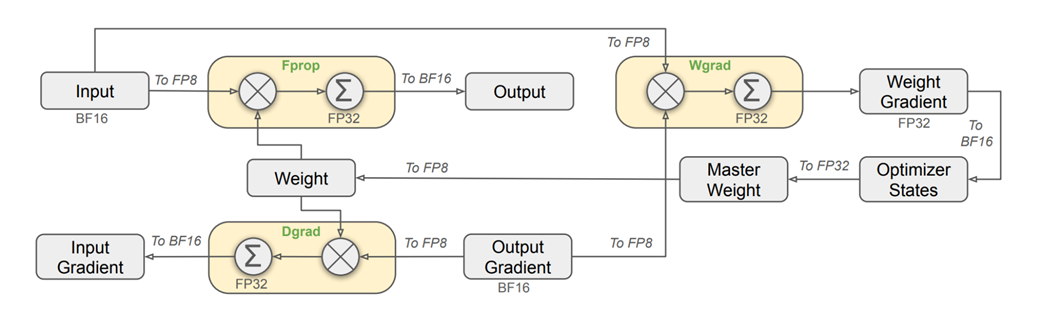
Follow the precision changes through a linear layer’s forward pass, gradient calculations, and weight update. section 5.6.1
Choosing formats is only part of the problem: converting values to FP8 can lose information. Fine-grained quantization uses separate scaling factors for small activation and weight blocks, limiting the effect of outliers. Intermediate Tensor Core results are accumulated in FP32. With local scaling managing dynamic range, DeepSeek uses the more precise FP8 E4M3 format for both forward and backward passes rather than switching to the wider-range E5M2 for gradients. section 5.7 section 5.6.4
Automatic mixed precision in PyTorch
Configure torch.amp.autocast with BF16 when CUDA and BF16 support are available, or FP16 otherwise; use a null context on CPU. Run the model’s forward pass and loss calculation inside the context, then call loss.backward() and optimizer.step(). The FP32 master weights are updated by the optimizer, while sensitive operations such as reductions, softmax, and loss remain in FP32. section 6.3.1 section 6.3.3
Listing 6.19 Imports and configuration in train.py
import os
import json
import time
from contextlib import nullcontext
import math
import numpy as np
import torch
from model import MiniDeepSeek, ModelArgs #A
# --- Configuration ---
# System
device = 'cuda' if torch.cuda.is_available() else 'cpu' #B
dtype = 'bfloat16' if torch.cuda.is_available() and torch.cuda.is_bf16_supported() else 'float16'

pt_dtype = {'float32': torch.float32, 'bfloat16': torch.bfloat16, 'float16': torch.float16}[dtype]
ctx = torch.amp.autocast(device_type=device.split(':')[0], dtype=pt_dtype) if 'cuda' in device else nullcontext() #C
# Training
out_dir = 'out'
ata_dir = 'data/tinystories_tokenized'
max_iters = 5000
eval_interval = 250
log_interval = 20
eval_iters= 100
batch_size = 24
block_size = 256
# AdamW Optimizer
learning_rate = 3e-4 #D
weight_decay = 0.1
beta1 = 0.9
beta2 = 0.95
Inspect the device check, dtype selection, and autocast context used by the training configuration. section 6.3.1