A mockup is a static visual representation of a proposed interface. It turns an approved wireframe into a polished view of the page’s appearance, including color, typography, spacing, imagery, and layout. section 5.3.2 section 3.3.2
Create mockups after wireframing has established the content organization, layout, and grid. Use them to explore the interface’s look and feel, communicate visual decisions, gather review feedback, and guide development rather than to reorganize content from scratch. section 5.3.2 section 1.1
A useful mockup process:
- Start with an approved wireframe and preserve its established hierarchy and content structure. section 5.3.2
- Apply visual design choices strategically: use color, space, and typography to support readability, brand image, and a meaningful first impression. section 5.3.2
- Review the static design with stakeholders, revise it, and hand the approved direction to developers for implementation. section 1.1
- Treat the design as a collaboration point rather than waiting until handoff to involve developers, especially in iterative workflows. section 1.1
Travel-agency homepage
After loosely arranging homepage sections in a wireframe, refine the approved structure into a polished mockup with precise measurements, prominent destination imagery, a trending-destinations section, and a lower-priority group-travel section. section 10.2
Figure 10.1 We loosely place our blocks of content to figure out how we will group content and the basic hierarchy of the page.
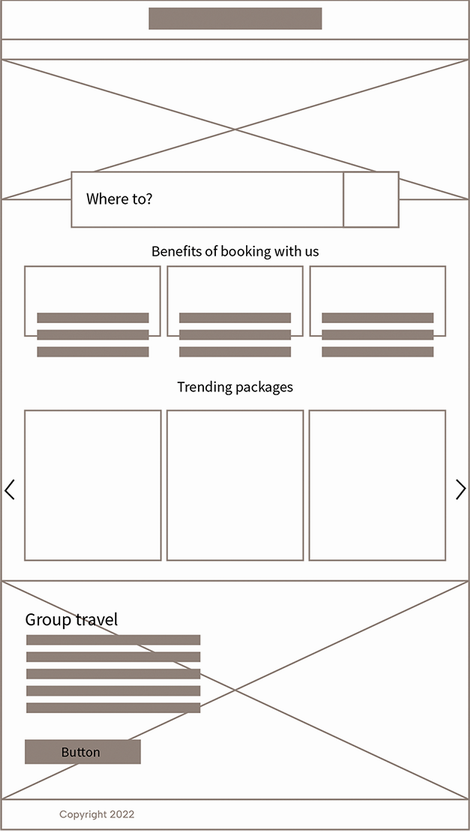
Use the figure to see how loosely placed content blocks establish grouping and page hierarchy before refinement into a polished mockup. section 10.2

