A mockup is a visual prototype that shows how a design should look at a chosen level of fidelity. After wireframing, mockups can move progressively closer to a real digital product. section 8.3.3
Use one to compare layouts before building. A dashboard crowded with bar graphs gave way to a clearer calendar view and line charts, making the design easier to judge and approve. section 8.3.3
Choose fidelity according to the decision the mockup needs to support:
- Add only enough color or visual detail to secure agreement on the palette and overall direction. section 8.3.3
- Invest in high fidelity when development will be costly or when stakeholders care strongly about fonts, colors, and interface details. section 8.3.3
A dashboard before construction
A wireframe exposed the weakness of a bar-graph-heavy layout. Replacing it with a calendar showing stayovers, check-ins, and checkouts, plus line charts, produced a direction ready for stakeholder approval. section 8.3.3
Figure 8.6 Sure enough in a surprise to no one, a zillion bar graphs (on the left) are overwhelming and busy. Mariette and I decided to go with the concept on the right instead, with a calendar view showing stayovers, check-ins, and checkouts (with symbols to indicate whether a night was fully or almost fully booked), and a line chart showing adults and children by room type (legends to be decided later).
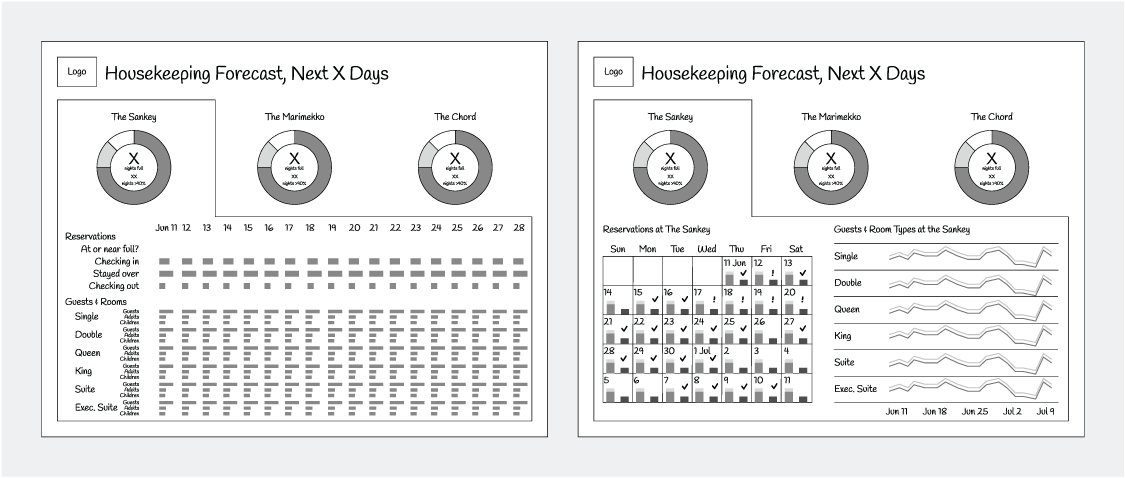
Compare the overwhelming bar-graph concept with the calmer calendar-and-line-chart alternative. section 8.3.3

