Model binding turns values in an HTTP request into the C# arguments an endpoint or page handler needs. The model binder finds request values, converts them to the required types, and populates parameters or objects before the handler runs. It is one-way: it reads request data, not changes made later to the object. section 7.1
A route value becomes an argument
Given app.MapPost("/square/{num}", (int num) => num * num), routing extracts num from the URL as a string. Model binding converts it to an int so the handler can calculate the result without parsing the URL itself. section 7.1
A binding model is a container for request data. It can be a single parameter or an object with several properties. Keep the data needed from the request in that model; let the handler or its services decide what to do with it. section 13.4.1 section 13.2
The defaults depend on the kind of handler:
- In minimal APIs, simple parameters can bind from route values, query strings, and headers. A complex parameter normally comes from a JSON request body, deserialized with System.Text.Json. JSON body binding is not available by default for GET requests, and minimal API model binding does not read form values. section 7.11 section 7.3
- In Razor Pages, handler parameters bind automatically. Publicly settable PageModel properties bind when marked [BindProperty]; property binding on GET requires [BindProperty(SupportsGet = true)]. The usual sources are form values, route values, and query strings. section 16.2 section 16.2.1
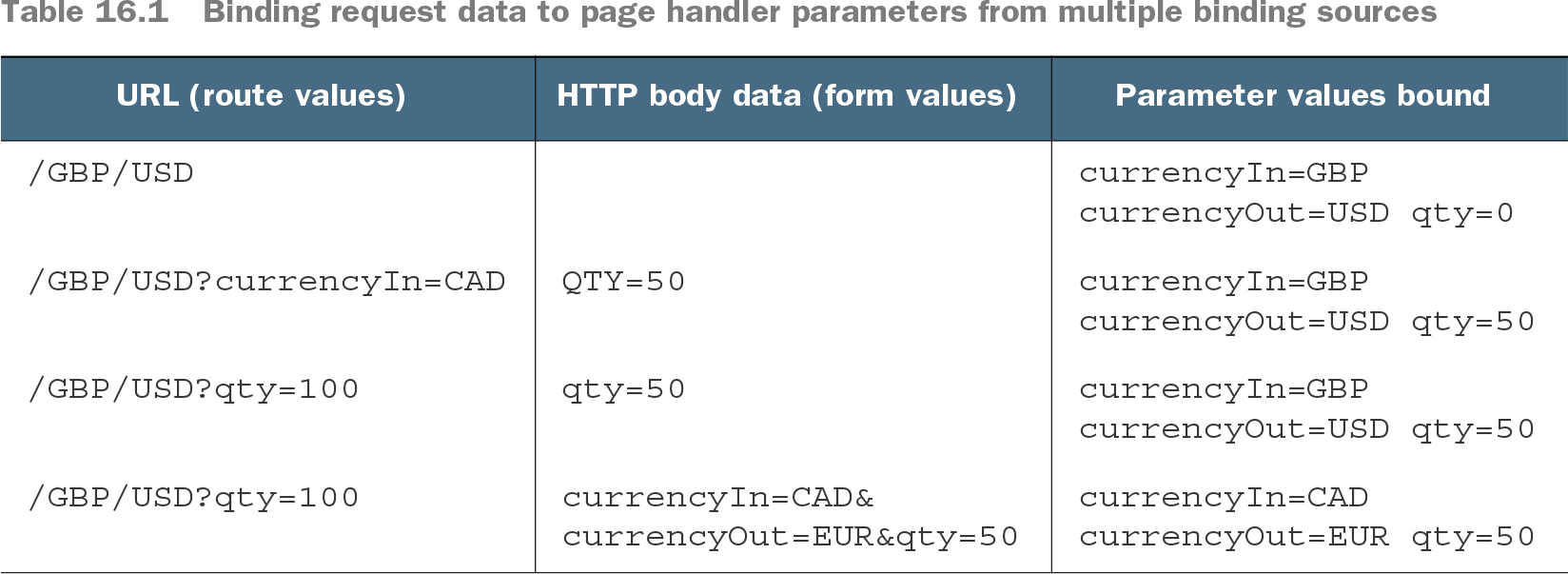
Table 16.1 Binding request data to page handler parameters from multiple binding sources (view table figure)
Compare the currency-converter requests to see how Razor Pages chooses values when form, route, and query sources supply the same parameter name. section 16.2.1
When several values belong together, bind a complex object instead of continually adding handler parameters. In Razor Pages, the binder traverses its properties and converts matching request strings. You can also select a source explicitly: [FromHeader] reads a header, while [FromBody] reads a JSON body when the default Razor Pages sources are not enough. section 16.2.2 section 16.2.3
Binding is not validation. Check user-provided values before relying on them. In minimal APIs, an incompatible or missing required parameter can produce a 400 Bad Request response. For an unusual request format, a parameter type can implement a static BindAsync method to read HttpContext and perform custom binding. section 7.0 section 7.11 section 7.7