A model store is a directory or storage location containing loadable model files for a model-serving runtime. In TorchServe, it may be a local host folder or cloud storage folder, while the frontend manages model lifecycles and backend workers run inference. section 7.4.2
Use the model store as one stage in the model-serving workflow:
- Copy packaged model files into the store; TorchServe does not load them automatically merely because they are present. section 7.2.4 section 7.2.5
- Register each model through the serving runtime's management API before accepting inference requests. section 7.2.5
- Let registered worker processes load the model and serve predictions through unified HTTP or gRPC endpoints. section 7.4.2 section 7.2.4
Mounting a TorchServe model store
Create a directory, copy a packaged model such as intent.mar into it, bind-mount the directory into a TorchServe container, and start TorchServe with --model-store=/tmp/models. Register the model afterward through the management API. section 7.4.2 section 7.2.5
Figure 7.9 A TorchServe architecture diagram (Source: Kuldeep Singh, “Deploying Named Entity Recognition model to production using TorchServe,” Analytics Vidhya, 2020)
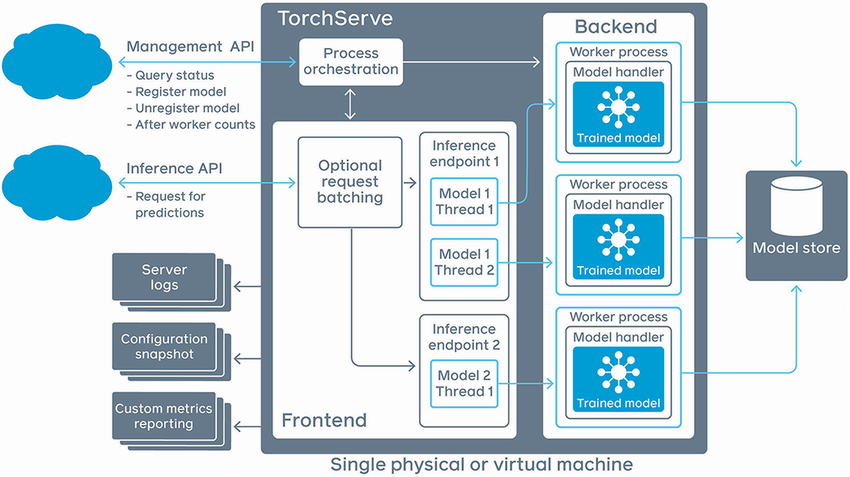
Use the architecture diagram to locate the model store between model management and the workers that load models for inference. section 7.4.2
Scaling changes the storage problem. Every TorchServe instance needs access to its own model store, and a load balancer obscures which instance receives registration requests. A Kubernetes sidecar proxy can download model files into shared storage and register them locally before forwarding prediction traffic. section 7.2.7
