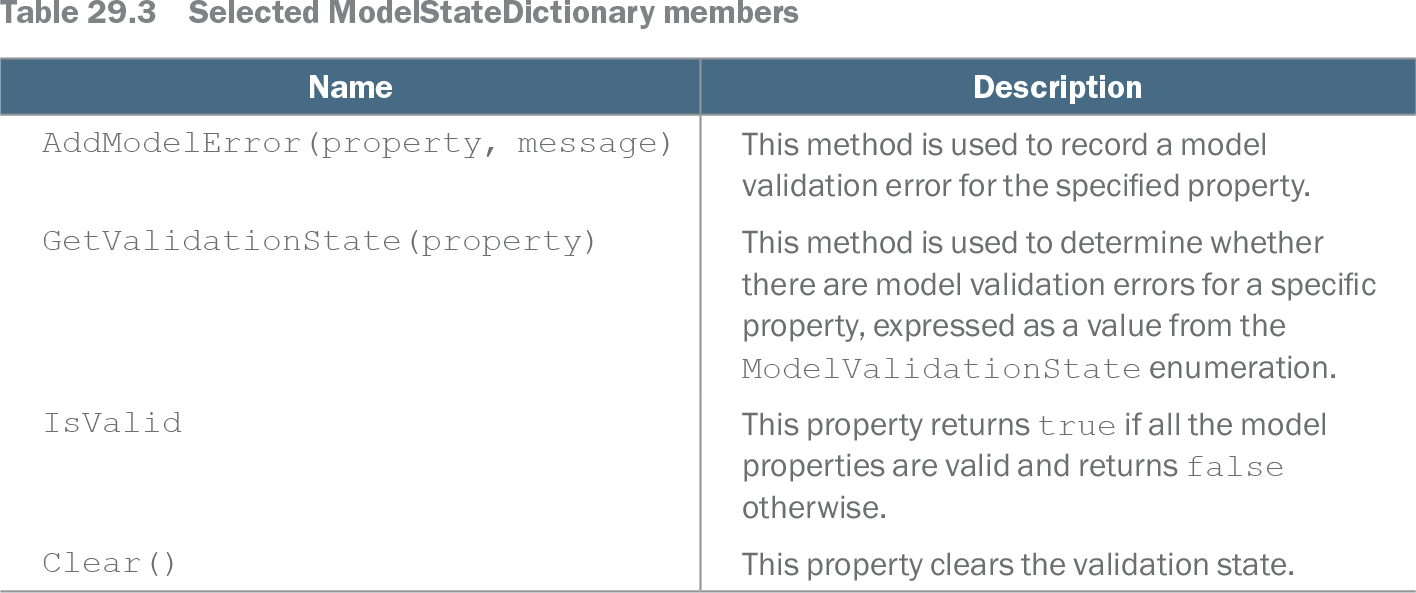
ModelState is the ControllerBase property that exposes a ModelStateDictionary for the current request. It tracks the outcome of model binding, especially validation errors for model properties. Check ModelState.IsValid before using a bound object: binding can produce an object even when request values are missing or invalid. section 29.3 section 9.3.5
Table 29.3 Selected ModelStateDictionary members (view table figure)
| Name |
Description |
|---|---|
| AddModelError(property, message) |
This method is used to record a model validation error for the specified property. |
| GetValidationState(property) |
This method is used to determine whether there are model validation errors for a specific property, expressed as a value from the ModelValidationState enumeration. |
| IsValid |
This property returns true if all the model properties are valid and returns false otherwise. |
| Clear() |
This property clears the validation state. |
The member table shows the working API: IsValid checks the overall result, AddModelError records a property error, GetValidationState checks one property, and Clear resets validation state. section 29.3
Accept a valid form; redisplay an invalid one
In a POST action receiving a GuestResponse, check ModelState.IsValid. Save the response and render Thanks only when it is true; otherwise return View() to redisplay the form. Razor validation tag helpers can then use the errors in the view context to show a summary and mark invalid inputs. A nullable bool? for WillAttend matters here: unlike bool, its null value lets [Required] detect that the guest made no selection. section 3.2.9
Validation attributes are not the only source of errors. In an order checkout action, an empty cart triggers ModelState.AddModelError("", "Sorry, your cart is empty!"); IsValid then prevents the order from being saved. For a property-specific rule, first check GetValidationState(nameof(Product.Price)) == ModelValidationState.Valid. Only then test whether the price is positive and, if necessary, add an error under that property name. This avoids piling a price-rule message onto a value that could not be bound as a decimal. section 9.3.5 section 29.3.3
Listing 29.9 Explicit validation in the FormController.cs file in the Controllers folder
using Microsoft.AspNetCore.Mvc;
using WebApp.Models;
using Microsoft.EntityFrameworkCore;
using Microsoft.AspNetCore.Mvc.ModelBinding;

namespace WebApp.Controllers {

    [AutoValidateAntiforgeryToken]
    public class FormController : Controller {
        private DataContext context;

        public FormController(DataContext dbContext) {
            context = dbContext;
        }

        public async Task<IActionResult> Index(long? id) {
            return View("Form", await context.Products
                .OrderBy(p => p.ProductId)
                .FirstOrDefaultAsync(p => id == null
                    || p.ProductId == id));
        }

        [HttpPost]
        public IActionResult SubmitForm(Product product) {

            if (ModelState.GetValidationState(nameof(Product.Price))
                    == ModelValidationState.Valid && product.Price <= 0) {
                ModelState.AddModelError(nameof(Product.Price),
                    "Enter a positive price");
            }

            if (ModelState.GetValidationState(nameof(Product.CategoryId))
                == ModelValidationState.Valid &&
                        !context.Categories.Any(c =>
                            c.CategoryId == product.CategoryId)) {
                ModelState.AddModelError(nameof(Product.CategoryId),
                    "Enter an existing category ID");
            }

            if (ModelState.GetValidationState(nameof(Product.SupplierId))
                    == ModelValidationState.Valid &&
                        !context.Suppliers.Any(s =>
                            s.SupplierId == product.SupplierId)) {
                ModelState.AddModelError(nameof(Product.SupplierId),
                    "Enter an existing supplier ID");
            }

            if (ModelState.IsValid) {
                TempData["name"] = product.Name;
                TempData["price"] = product.Price.ToString();
                TempData["categoryId"] = product.CategoryId.ToString();
                TempData["supplierId"] = product.SupplierId.ToString();
                return RedirectToAction(nameof(Results));
            } else {
                return View("Form");
            }
        }

        public IActionResult Results() {
            return View(TempData);
        }
    }
}
The controller listing puts explicit property checks before the final ModelState.IsValid decision, including checks against database IDs. section 29.3.3
A web API can return BadRequest(ModelState) when validation fails, instead of redisplaying a view; the response describes errors to the client, though clients may rely only on its 400 status. Controller unit tests can add an error directly to ModelState to exercise the invalid branch, then verify that no order was saved. section 19.5.4 section 9.3.5