A module manifest is a PowerShell data file with the .psd1 extension. Pair it with a .psm1 script module to record module metadata, control which functions are public, and assign a version. A .psm1 alone can hold related functions, but adding a manifest makes the module easier to version and maintain. section 2.2.2
Use matching names for the top-level module folder, .psd1 manifest, and .psm1 root module. Place those files inside a version-number folder so multiple installed versions can coexist and PowerShell can load the module by name with Import-Module. section 2.2.2
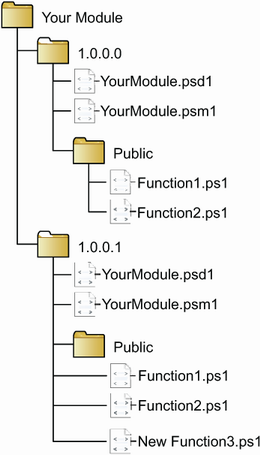
This layout shows why the manifest belongs beside the root module inside a versioned module folder. section 2.2.2
Treat the manifest as the module’s public contract:
- Set the module version so installations can distinguish releases and support testing or upgrades alongside existing versions. section 2.2.2
- List exported functions explicitly. FunctionsToExport = '*' exports every matching function; naming only intended commands keeps helper functions unavailable to callers. section 2.2.3
- Update the export list whenever a new public function is added. section 2.2.3
- Organize function files under Public and Private folders if useful, but rely on the manifest—not folder names alone—to make functions private. section 2.2.3
FileCleanupTools exports only cleanup commands
A FileCleanupTools module can load function scripts from its Public folder while keeping implementation helpers separate. Its manifest lists Remove-ArchivedFiles and Set-ArchiveFilePath in FunctionsToExport, so importing the module exposes those commands rather than every loaded function. section 2.2.2 section 2.2.3
Install custom modules in a directory listed by $env:PSModulePath when they should be imported by name. Choose the appropriate scope: automations running under the system account need an AllUsers location rather than a CurrentUser-only installation. section 2.2.3
