mongot is the search process that runs alongside MongoDB’s database process, mongod. It builds Atlas Search indexes from collection index definitions, follows change streams to update those indexes, and handles search queries. It connects MongoDB to Apache Lucene without requiring a separate search system. section 11.3.1 section 11.8
Figure 11.3 The Atlas Search architecture integrates MongoDB with the Lucene Search Index managed by the mongot process. MongoDB (mongod) serves as the primary database, sending object IDs and metadata to mongot via change streams for synchronization and monitoring. mongot uses APIs for index configuration and search operations. The Lucene component handles search indexes and ObjectIDs, enabling efficient query processing. Index configuration is managed through MongoDB Atlas Automation, interfacing with the Atlas UI, API, and CLI. Search queries initiated via mongosh, Compass, or drivers are processed by the Atlas Search cluster. (Image © MongoDB 2024 CC BY-NC-SA 3.0)
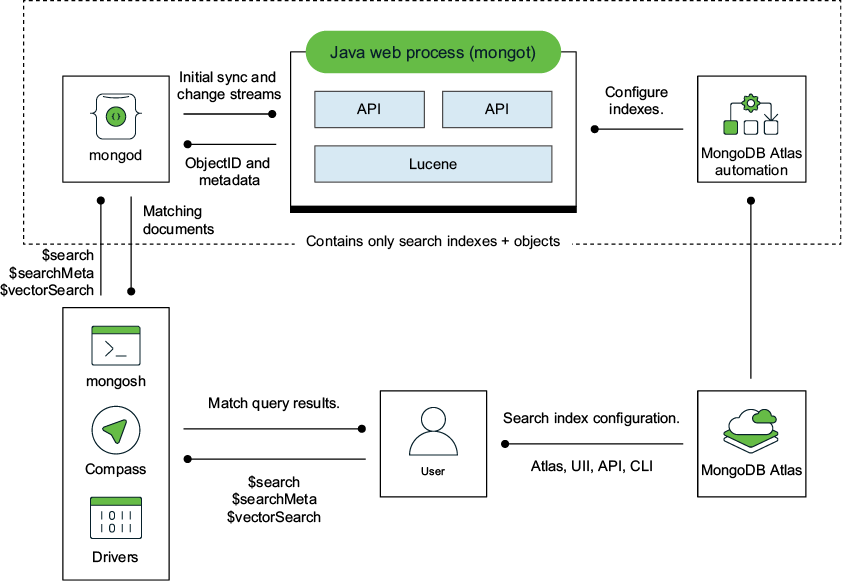
Follow the path from mongod through change streams to the Lucene index managed by mongot, then the path used to process a search query. section 11.3.1
Choose where mongot runs according to the workload:
- On dedicated Atlas Search Nodes, mongot runs separately from mongod so search work does not compete with database operations. These nodes are available for dedicated M10-or-higher sharded and unsharded clusters; allow 20% local SSD storage overhead for index operations. section 11.3.2
- For Atlas Vector Search, dedicated search nodes also separate mongot from mongod. Parallel query execution can lower latency on large data sets, at the cost of more resources. section 12.6
- In an Atlas CLI local deployment, mongot runs as a separate component alongside mongod and supplies full-text and vector search for development. section 13.1
Inspect and test a local mongot
After starting a local deployment, use `docker ps` to find its container, then `docker exec -it <container_id> /bin/bash` and `cd /opt/mongot/` to inspect its files. In mongosh, create a search index with `db.collection.createSearchIndex()`, verify it with `getSearchIndexes()`, and remove it with `db.collection.dropSearchIndex(<name>)`. The local mongot binary described here is a private preview for testing, not production use. section 13.4.2 section 13.6
