A router selects the most specific matching route when forwarding a packet: the matching route with the longest network prefix. A route matches when the destination IP address belongs to its specified network. Longer prefixes identify smaller address ranges, so /32 in IPv4 or /128 in IPv6 is more specific than /24 or /64. section 9.2.2 section 21.2.2
Use the rule in this forwarding sequence:
- Compare the packet’s destination IP address with routes in the routing table. section 9.2.2
- Choose the matching route with the greatest prefix length; a /32 or /128 host route overrides broader matching routes. section 9.2.2 section 21.2.2
- Forward through the selected route, receive the packet locally when the selected route is local, or drop it when no route matches. section 10.3
- Do not confuse forwarding selection with choosing which learned routes enter the routing table; administrative distance and metrics serve the latter process. section 17.3.3 section 21.2.2
R1 chooses a local host route
For destination 192.168.1.1, R1 finds both 192.168.1.0/24 and 192.168.1.1/32. It selects the /32 local route and receives the packet rather than forwarding it. In a routed path, R1 might instead select 192.168.3.0/24 via 192.168.12.2, use ARP to learn the next-hop MAC address, and forward the packet.
Figure 9.6 R1 receives a packet and selects the best route for that packet. (1) R1 receives a frame on its G0/0 interface. The destination MAC is its own, so it de-encapsulates it and examines the packet inside. (2) The packet’s destination IP address is 192.168.1.1. R1 performs a routing table lookup and finds that two routes match the packet’s destination IP address: the connected route to 192.168.1.0/24 and the local route to 192.168.1.1/32. R1 selects the most specific route: 192.168.1.1/32. (3) Because R1 selects a local route, it receives the packet for itself; it does not forward the packet.
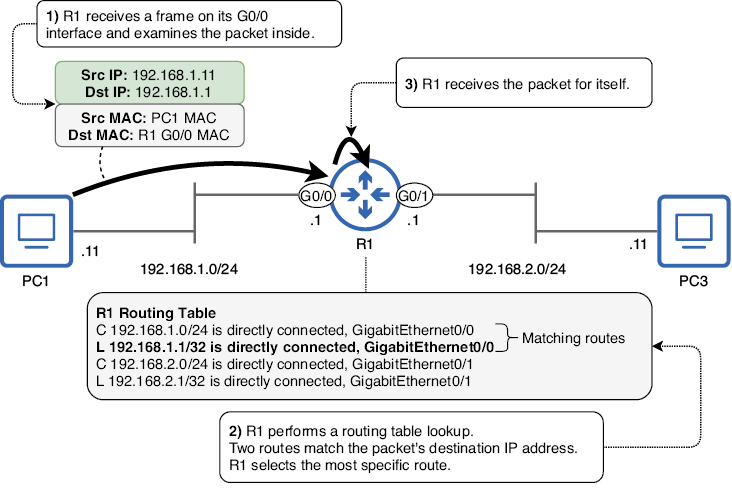
Trace the packet from frame receipt through de-encapsulation, route lookup, selection of 192.168.1.1/32, and local delivery. section 9.2.2
