A default route is the least-specific IPv4 route, written as 0.0.0.0/0. It matches every IPv4 destination, but route selection uses it only when no more-specific route matches. This makes it a practical catch-all path, commonly toward an internet service provider. section 9.3.2 section 9.4
Use a default route to simplify forwarding beyond known networks:
- Keep specific routes for internal networks; send all unmatched destinations through the default route. section 9.3.2
- Configure IPv4 with ip route 0.0.0.0 0.0.0.0 followed by a next-hop address or exit interface. section 9.3.2 section 9.4
- Verify the result with show ip route; Gateway of last resort is not set means no default route is configured. section 9.3.2
R1: internal routes plus internet access
R1 can keep specific routes to 192.168.2.0/24 and 192.168.3.0/24, then configure ip route 0.0.0.0 0.0.0.0 203.0.113.2. Traffic for either internal network uses its specific route; other destinations use the ISP next hop. The routing table displays S* 0.0.0.0/0 via 203.0.113.2. section 9.3.2
Figure 9.11 R1 has two routes to specific destination networks and one default route to the internet. (1) A route to 192.168.2.0/24, with R2 G0/0 as the next hop. (2) A route to 192.168.3.0/24, with R3 G0/0 as the next hop. (3) A default route, with the ISP’s IP address (203.0.113.2) as the next hop.
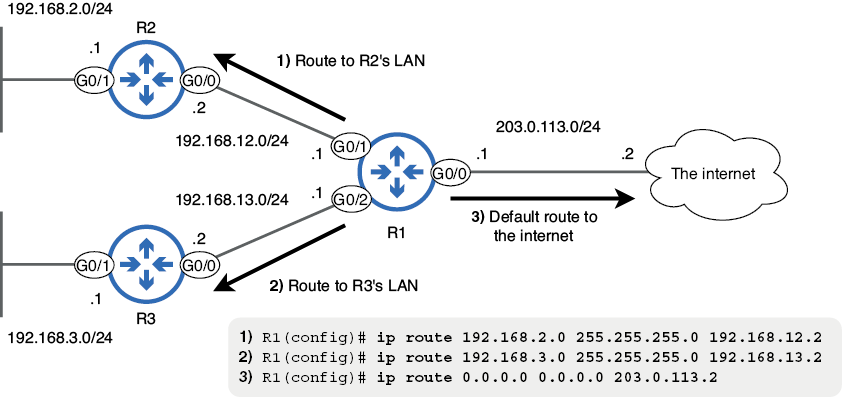
Use the topology to compare specific internal routes with the default route toward the ISP. section 9.3.2
