MotherDuck extends DuckDB into a collaborative, serverless cloud analytics platform. It lets you query cloud databases and storage from a browser, the DuckDB CLI, or language APIs without configuring servers, clusters, or warehouse instances. section 7.1 section 7.4
Its hybrid engine decides whether work runs locally, remotely, or across both sides. It can send local data for remote joins or filters, or fetch remote data for local execution. section 7.1.1
Use MotherDuck when you need to:
- Run a simpler cloud data warehouse for datasets that do not require distributed processing at very large scale. section 7.1.2
- Join hot cloud data with heterogeneous lake sources such as Parquet, CSV files in S3, or Apache Iceberg data. section 7.1.2
- Provide a serverless analytics backend for dashboards, APIs, and applications. section 7.1.2
- Share read-only database snapshots with other MotherDuck users. section 7.1.2
Upload and query a local database
Open a local DuckDB file, create a small table, and upload it to a remote database: .open countries.duckdb CREATE TABLE cities AS SELECT * FROM (VALUES ('Amsterdam', 1), ('London', 2)) cities(Name, Id); .open md: CREATE DATABASE "countries" FROM 'countries.duckdb'; USE countries; FROM cities; The query returns Amsterdam and London with their identifiers. Large uploads may be slower than exporting Parquet files to cloud storage first. section 7.3.1
Figure 7.1 Hybrid query execution as implemented within MotherDuck
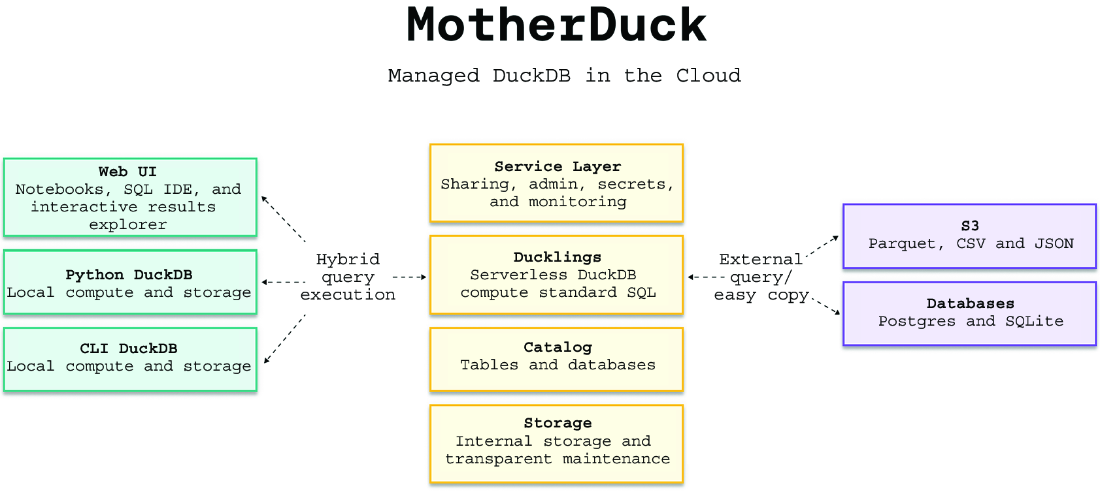
Use the architecture figure to inspect how local DuckDB, remote DuckDB compute, storage, catalog, and service components cooperate during hybrid query execution. section 7.1.1
