A Multi-AZ deployment with two standby instances keeps two standby RDS database instances across availability zones. The primary handles writes while the standbys provide redundancy and can support read-only queries. section 10.5 section 10.5.1
This configuration improves a production database in several ways:
- Uses both standby instances as read replicas to increase read capacity. section 10.5
- Reduces transaction-commit latency and jitter, improving write performance. section 10.5
- Fails over in less than 60 seconds when the primary becomes unavailable. section 10.5
- Continues availability during maintenance by switching traffic to a standby database. section 10.5.1
Enabling Multi-AZ in CloudFormation
Set MultiAZ to true on the AWS::RDS::DBInstance resource, then update the CloudFormation stack. Deployment takes several minutes, and AWS creates the highly available database configuration. section 10.5.1
Clients fail over to a standby through DNS when the primary fails. The configuration is currently available only for PostgreSQL and MySQL RDS engines, and it costs more than a single-instance deployment. section 10.5 section 16.0
Figure 10.6 The client fails over to the standby database if the primary database fails, using DNS resolution.
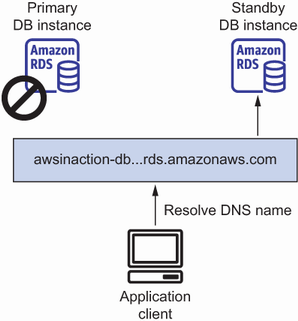
Shows how clients use DNS to reach the standby database after primary failure. section 10.5
