A multi-page app separates distinct user experiences into independently defined pages while one central entrypoint chooses and runs the current page. This structure fits applications with flows such as signup, login, and authenticated CRUD work. section 8.1.2 section 8.4.1
A Streamlit multi-page app typically divides responsibility like this:
- Store each page in its own Python script, such as frontend/login.py and frontend/signup.py. section 8.4.1
- Define pages with st.Page, supplying a script path, display title, and optional icon. section 8.4.1
- Use st.navigation to expose the available pages, then call page.run() to execute the selected page. section 8.4.1 section 8.7
- Keep shared objects such as a service hub in st.session_state so pages can access them across reruns. section 8.4.1
Signup and login flow
A Haiku Haven app defines login and signup as separate pages. The entrypoint registers both with st.Page, displays them through st.navigation, and runs the selected page. The signup page validates matching passwords before creating an account and showing success or error feedback. section 8.1.2 section 8.4.1
Figure 8.1 Rough sketches of the pages we want in Haiku Haven
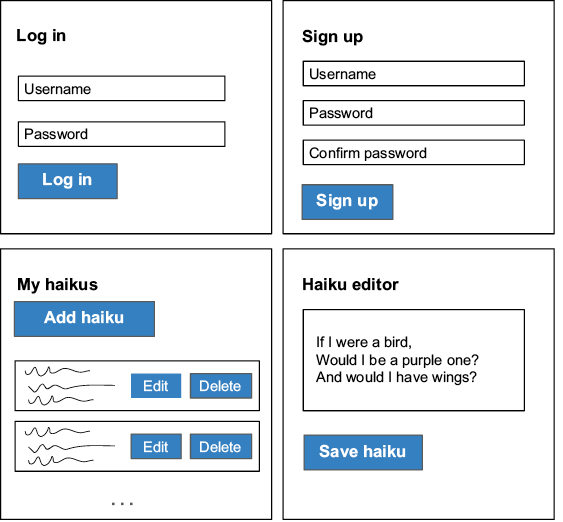
Use the rough page sketches to compare signup, login, haiku management, and editing flows before implementing navigation. section 8.1.2
