A multiline filter combines related records from multiple events into one multiline event. It behaves like a parser filter, but uses multiline-prefixed settings to identify the content field and parser. section 6.6
Configure the filter around these operational choices:
- Select a custom or predefined parser with multiline.parser and identify the field with multiline.key_content. section 6.6
- Set buffer on when separate events for one record arrive in sequence with the same tag; verify ordering before enabling consolidation. section 6.6
- Control oversized or unterminated records with emitter storage, emitter_mem_buf_limit, and flush_ms. section 6.6
Tail input with a custom multiline parser
A practical configuration tails multiline-json-small.txt, tags records multi-feed, applies multiline_Demo to the log field, enables buffering, and writes the result to stdout. Run it with fluent-bit -c fluentbit/multiline-parser-filter.conf. section 6.6
Figure 6.2 Each part of a multiline log (left) can correlate to a parser configuration (right). As long as the regex is valid at the right point, we will keep linking lines into a single event. In the figure, the rule named line_2 picks up five lines. As the line_2 rule is cyclical, we can continue consuming many lines into the same event if it isn’t expressed well.
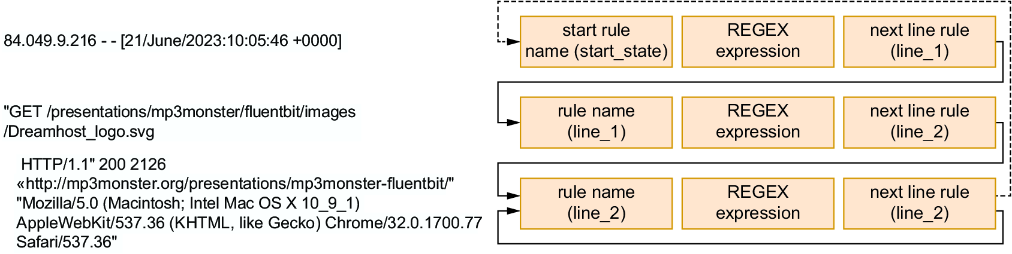
Inspect how stateful regex rules link lines and how a cyclical continuation rule can consume too many lines when expressed incorrectly. section 6.6
