A multiline parser identifies the boundaries of one log event when that event arrives across several lines, then joins the related lines into a single record. In Fluent Bit, it can run on supported input plugins or through the multiline filter. Use it for stack traces, formatted JSON, and other output that must remain one event for downstream processing. section 6.6
Configure `multiline.parser` with one or more parser names. On a `tail` input reading Kubernetes container logs, `multiline.parser docker, cri` tries Docker format first and then CRI if the first attempt produces errors. Prefer a single known format when the runtime is certain. section 4.7.6
Listing 4.9 Extract from Helm chart: values.yaml
luaScripts:                   #1
  filter_example.lua: |
    function filter_name(tag, timestamp, record)
        -- put your lua code here.
    end

config:                           #2
  service: |              #3
    [SERVICE]
        Daemon Off
        Flush {{ .Values.flush }}       #4
        Log_Level {{ .Values.logLevel }}
        Parsers_File /fluent-bit/etc/parsers.conf        #5
        Parsers_File /fluent-bit/etc/conf/custom_parsers.conf
        HTTP_Server On
        HTTP_Listen 0.0.0.0
        HTTP_Port {{ .Values.metricsPort }}
        Health_Check On

  inputs: |
    [INPUT]
        Name tail
        Path /var/log/containers/*.log
        multiline.parser docker, cri           #6
        Tag kube.*
        Mem_Buf_Limit 5MB       #7
        Skip_Long_Lines On

    [INPUT]
        Name systemd
        Tag host.*
        Systemd_Filter _SYSTEMD_UNIT=kubelet.service
        Read_From_Tail On

  filters: |
    [FILTER]
        Name kubernetes
        Match kube.*
        Merge_Log On
        Keep_Log Off
        K8S-Logging.Parser On
        K8S-Logging.Exclude On

    [FILTER]
        Name    lua
        Match   <your-tag>
        script  /fluent-bit/scripts/filter_example.lua  #8
        call    filter_name

  outputs: |
    [OUTPUT]
        Name es        #9
        Match kube.*
        Host elasticsearch-master
        Logstash_Format On
        Retry_Limit False
This Helm values fragment places `multiline.parser docker, cri` on a tail input for `/var/log/containers/*.log`, alongside tags and memory limits used for Kubernetes log collection. section 4.7.6
Choose the placement and controls based on how the lines entered the pipeline:
- Use an input-plugin parser when the input supports multiline processing. section 6.6
- Use the `multiline` filter for records already ingested separately; set `multiline.key_content` to the field containing the text and select the parser with `multiline.parser`. section 6.6
- Set `buffer on` when one logical event has become multiple records, but only when ordering and safeguards prevent unrelated events from being merged. section 6.6
- Control buffered output with `emitter_storage.type`, `emitter_mem_buf_limit`, and `flush_ms`; these limit storage choice, memory use, and forced flushing when an ending is not recognized. section 6.6
Custom regex parser through a filter
A tail input tags records as `multi-feed`. A multiline filter matches that tag, reads the `log` field, enables buffering, and selects `multiline_Demo`. The custom parser uses `start_state` to match a line beginning with `{`, then a `cont` state to keep consuming lines beginning with `-`; the resulting output contains the joined multiline JSON text in one `log` record. section 6.6
Figure 6.2 Each part of a multiline log (left) can correlate to a parser configuration (right). As long as the regex is valid at the right point, we will keep linking lines into a single event. In the figure, the rule named line_2 picks up five lines. As the line_2 rule is cyclical, we can continue consuming many lines into the same event if it isn’t expressed well.
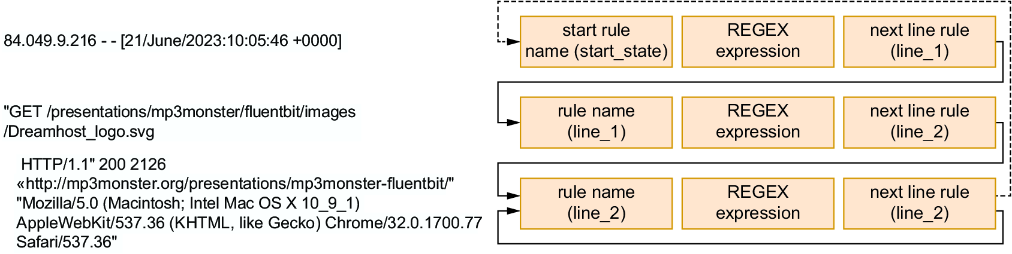
The figure shows how regex rules and parser states link successive lines. A cyclical continuation rule can keep consuming lines indefinitely if it is too broad. section 6.6
Multiline processing costs more than single-line handling because Fluent Bit must determine where an event ends before processing it. Failed termination can also create large entries. Reduce multiline output upstream when possible, such as by discouraging multiline logs or stripping newline characters in logging frameworks. section 4.7.6 section 6.6
