Multiprocessing lets an operating system manage multiple tasks so more than one can make progress on available processor resources. When one task waits for input or file I/O, the system can run another task and keep the CPU productive. section 2.1
A task can move through several operating-system states:
- Enter the job queue after submission when it is not yet ready to run. section 2.1
- Move to the ready queue, then run when the CPU becomes available. section 2.1
- Enter an I/O waiting queue when it requests file input, allowing another ready task to use the CPU. section 2.1
- Resume after the I/O operation returns data, or terminate when execution finishes. section 2.1
A concurrent command pipeline
The command `curl -s https://www.rfc-editor.org/rfc/rfc1122.txt | wc` runs `curl` and `wc` as separate concurrent processes. A pipe buffers curl's output for wc's input: curl blocks when the buffer is full, while wc blocks when it is empty. After curl finishes, an end-of-data marker allows wc to terminate. section 2.2.3
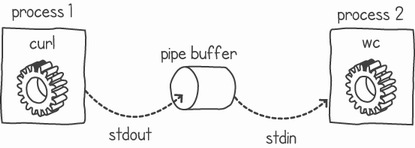
Use the process-and-pipe diagram to trace how separate commands exchange data while running concurrently. section 2.2.3


