Multithreading lets multiple threads of a program make progress concurrently. That does not guarantee parallel execution: concurrent tasks can take turns on one processor, while parallel tasks run at the same time. The distinction matters when the goal is to use multiple CPU cores rather than simply manage overlapping work. section 3.0
Understanding sequential, concurrent, and parallel models. Sequential execution occurs when all tasks are executed in sequence and never interrupted. Concurrent execution with no parallelism adds the possibility of a task being interrupted by another and later resumed. Parallelism occurs when several tasks are run at the same time. Even with parallelism, it is quite common for preemption to still occur as the number of processors/cores may not be enough for all tasks. A dream scenario is when there are more processors than tasks: this allows parallel execution of all tasks without the need for any preemption.
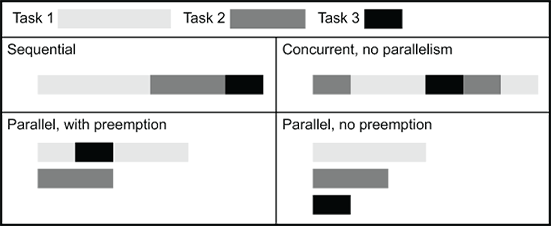
The execution-model diagram separates sequential work, interleaved concurrency, and simultaneous parallelism—the distinction needed to assess what threads accomplish. section 3.0
A threaded executor from Python’s concurrent.futures module can manage concurrent MapReduce jobs. It is tempting to expect those jobs to use all available compute power. In CPython, however, the Global Interpreter Lock (GIL) prevents Python threads from executing Python code in parallel. Thread switching can add overhead, particularly when multicore hardware is ready to run the threads simultaneously. section 3.3 section 3.3.3
Choose the execution approach according to the work:
- For CPU-intensive pure Python work, consider multiprocessing to use multiple cores; keep tasks coarse enough that communication overhead does not dominate. section 3.6
- For lower-level code, libraries such as NumPy, SciPy, and scikit-learn can release the GIL and run native multithreaded work in parallel. section 3.3.3
- For application structure, threads can still be useful without being the best route to CPU speedup. Other Python implementations may also have different GIL behavior. section 3.6
Configure Dask workers and threads
In dask.distributed, a worker can have multiple threads, or a machine can run multiple worker processes. The command `dask-worker --nprocs 4 --nthreads 1 --memory-limit 1GB 127.0.0.1:8786` specifies four worker processes with one thread each. Worker and thread counts depend on the workload: for NumPy-based work, an alternative is to let NumPy manage its own native threads rather than add Python worker threads. Inspect worker activity through the scheduler dashboard instead of assuming that more threads mean more throughput. section 10.3.1










