A multiuser site lets separate people sign in, manage account-linked data, and receive different permissions or personal experiences. Django supplies user accounts, authentication, authorization tools, and password management so users can serve themselves instead of routing every request through administrators. section 6.0 section 6.1
Authentication proves who someone is; authorization decides what that person may do. Django’s user model tracks accounts and encrypted passwords, while middleware and sessions carry login state between URL routing and view execution. section 6.1
A practical Django implementation commonly combines these parts:
- Protect views with login requirements; anonymous users are redirected to the login page. section 6.8
- Store extra account information in a profile associated with the User object through a OneToOneField, or define a custom User object. section 6.8
- Keep authorization close to each view and add more detailed permissions when the application needs them. section 6.1 section 6.8
- Customize login and password-reset templates while using Django’s supplied views; development email can print reset messages to the console. section 6.8
RiffMates
RiffMates grows from an administrator-managed site into a musicians-seeking-musicians service. Musicians can edit profiles, create bands, and invite members, while authorization prevents rival bands from editing one another’s profiles. section 6.1 section 1.2.4
Figure 6.1 Session management and login control through middleware
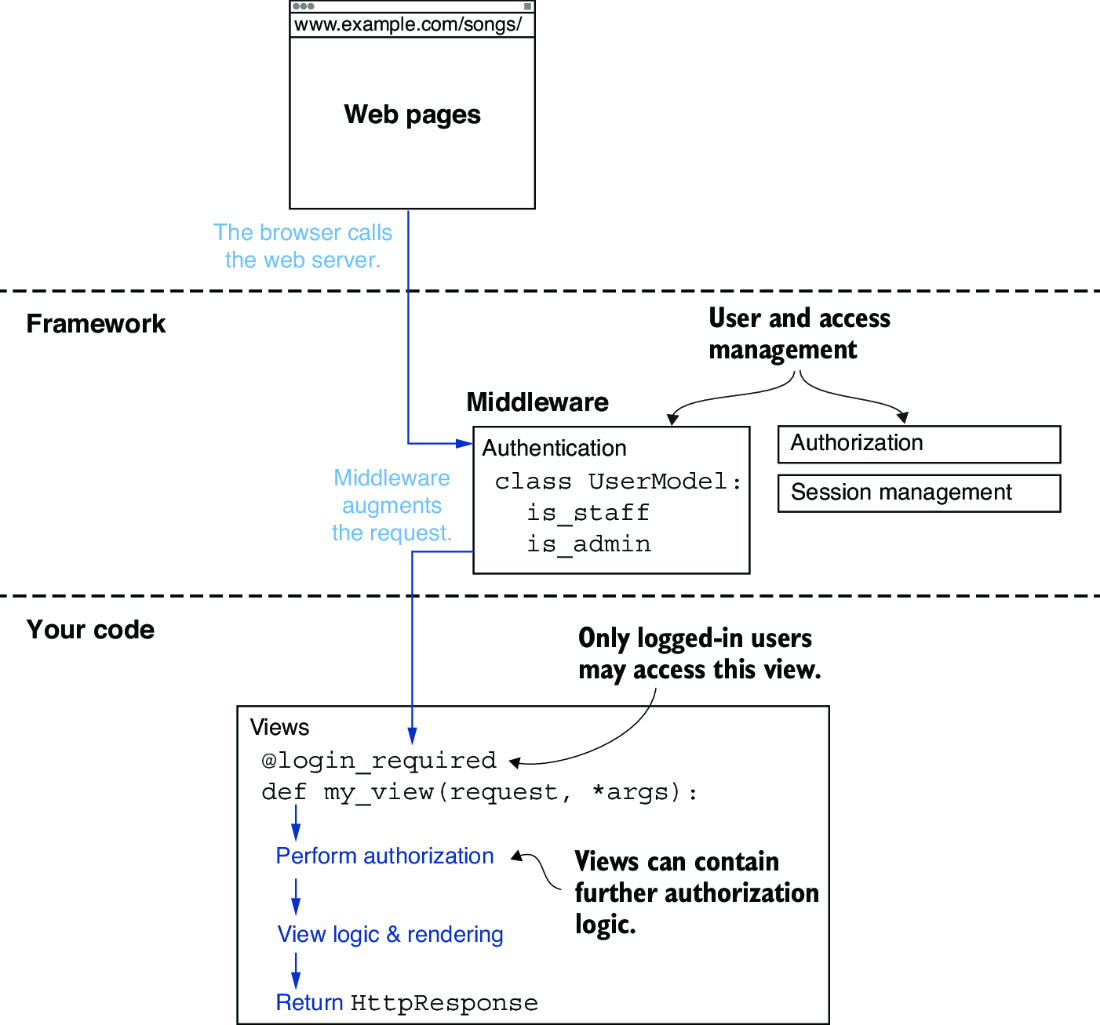
Trace how session management and login control pass through middleware before a view runs. section 6.1
