MySQL is a relational database used to store and query structured application data. In WordPress, it holds posts, comments, and other content. Uploaded images, plug-ins, and themes are files stored outside the database. section 2.2.3
On AWS, Amazon Relational Database Service (RDS) can run MySQL without putting the database on a web server. You choose its storage and instance size; RDS handles tasks such as backups, patches, and updates. This avoids making a single web-server virtual machine the database’s single point of failure. section 2.1 section 10.1
Figure 2.1 The company’s blogging infrastructure consists of two load-balanced web servers running WordPress, a network filesystem, and a MySQL database server.
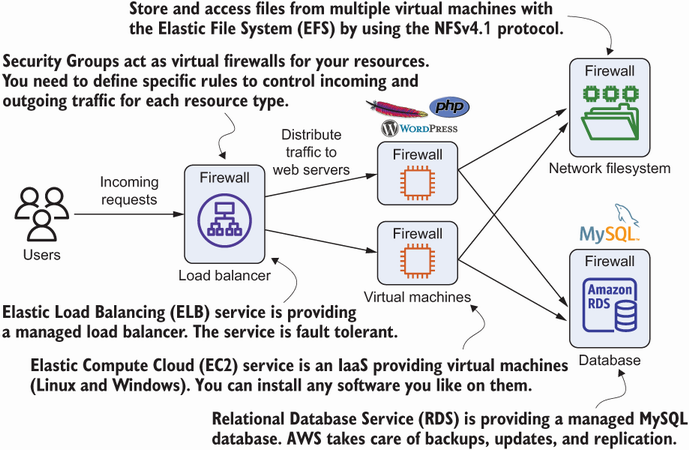
The architecture separates the MySQL database from two load-balanced WordPress web servers and the shared filesystem used for files. section 2.1
For a small WordPress deployment, check these practical choices:
- In the RDS console, open Databases and select the instance whose engine is MySQL community. A low-traffic example uses one virtual CPU, 1 GB of memory, and cheaper magnetic storage. section 2.2.3
- Restrict database access on port 3306 to the virtual machines running the web servers, rather than opening it to general internet traffic. section 2.1
- For production availability, use RDS Multi-AZ mode. Monitor CloudWatch metrics when investigating performance or reconsidering instance size. section 10.8
Move an existing WordPress database
Export an existing database with the MySQL client, for example `mysqldump -u $UserName -p $DatabaseName > dump.sql`. Start a virtual machine in the RDS database’s region and VPC, upload the dump, and import it from that machine. Given a reachable database endpoint in `$DBAddress`, an import takes the form `mysql --host $DBAddress --user wordpress -p < wordpress-import.sql`; replace the filename with the dump you uploaded. section 10.2
Managed MySQL removes some operating work, not the need to choose capacity, control access, and plan availability. RDS also offers backup and restore, while read replication can help read-intensive workloads. section 2.1 section 10.8

