A nameserver provides the DNS configuration that directs a domain’s traffic. In a Cloudflare CDN setup, changing the domain’s nameservers transfers DNS management to Cloudflare. section 12.1.3
Configure nameservers for a Cloudflare-managed domain by following this sequence:
- Choose Full Setup when using Cloudflare’s free plan and managing the domain’s DNS records there. section 12.1.3
- Let Cloudflare scan and copy the domain’s existing DNS records into its management panel. section 12.1.3
- Replace the domain’s current nameservers with the nameservers supplied by Cloudflare so the configuration becomes active. section 12.1.3
CDN domain setup
A domain configured for Cloudflare remains inactive after its DNS records are copied until its registrar-level nameservers are updated to Cloudflare’s values. section 12.1.3
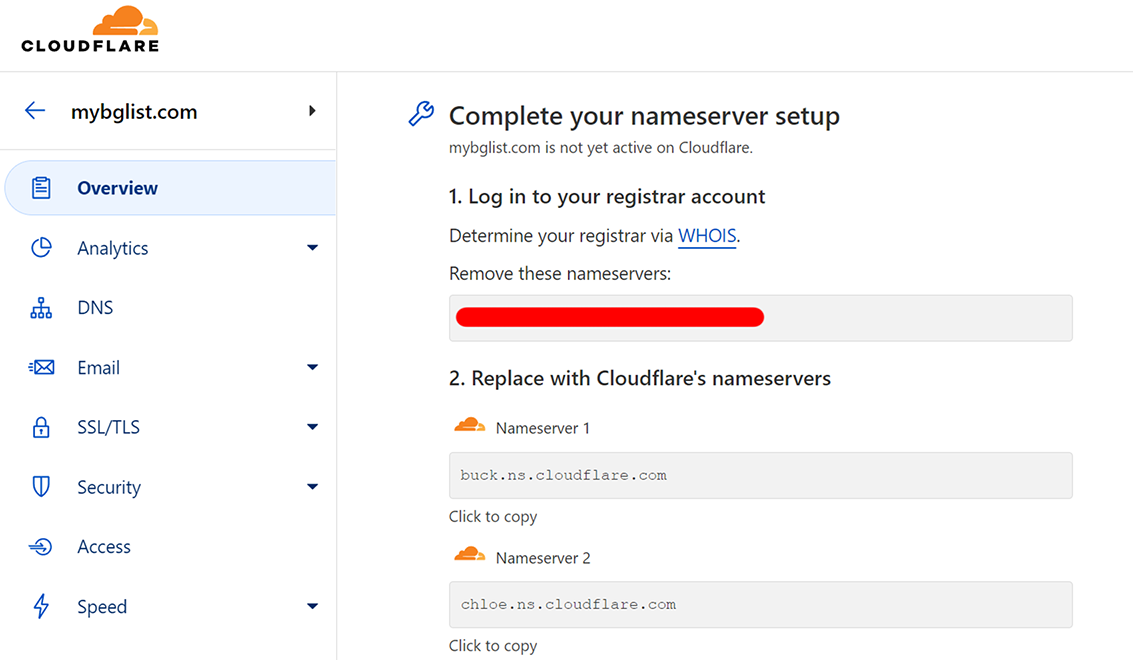
Use the setup guide to inspect the Cloudflare workflow for replacing the domain’s existing nameservers. section 12.1.3
