liveBook · Manning

Nargs

As explained in Tiny Python Projects: Learn coding and testing with puzzles and games

nargs is an argparse argument-definition parameter that specifies how many command-line values an argument accepts.

nargs is an argparse parameter that controls how many command-line values an argument accepts. It lets a program require one or more values, permit zero or more, or accept an optional value. section 6.5

Use these common nargs values:

Accepting picnic items

Define a positional argument with `nargs='+'` when the program needs at least one item: `parser.add_argument('item', nargs='+', help='Item(s) to bring')` With no item, argparse reports an error; with `chips`, the program receives the supplied item. section 3.1

Reading optional file inputs

Use `nargs='*'` for zero or more files. Combined with `type=argparse.FileType('rt')` and `default=[sys.stdin]`, the program can process named readable files or standard input. section 6.3.1

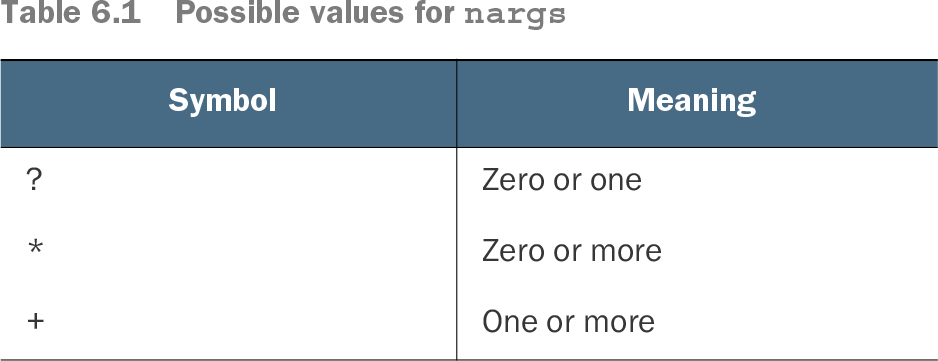
Table 6.1 Possible values for nargs (view table figure)

Symbol

Meaning

?

Zero or one

*

Zero or more

+

One or more

Use the table to compare the three symbolic nargs values and their accepted argument counts. section 6.1.1

How Tiny Python Projects: Learn coding and testing with puzzles and games covers it

How deep it goes
Explains ?, *, and + through argument definitions, usage output, defaults, and resulting input collections.
Examples
Uses picnic items, word-count file inputs, and Mad Libs substitution strings as concrete multi-value arguments.
What it assumes
Assumes basic Python command-line and argparse argument definitions while demonstrating defaults and validation.
What you can do after
Apply it via argparse to constrain positional or optional inputs and handle zero-or-more or one-or-more values.
How it connects
Connects argparse argument counts with positional arguments, optional arguments, readable file arguments, default values, and sys.stdin.

Related concepts

This explainer was generated by Manning's knowledge graph from the text of Tiny Python Projects: Learn coding and testing with puzzles and games. The section links point to the parts of the book it draws on.