A NAT pool is a configured range of inside global addresses that dynamic NAT assigns to permitted inside local addresses. Unlike static NAT, the router creates one-to-one mappings as traffic requires. section 9.3.2
Configure dynamic NAT around three linked elements:
- Mark interfaces with ip nat inside or ip nat outside. section 9.3.2
- Identify translatable inside local addresses with an ACL; permitted sources are translated, while denied sources are forwarded without translation. section 9.3.2
- Create the pool with ip nat pool name start-ip end-ip prefix-length length, or use a netmask instead. section 9.4
- Map the ACL to the pool with ip nat inside source list acl pool pool. section 9.4
Cisco IOS configuration
R1(config)# access-list 1 permit 10.0.0.0 0.0.0.255 R1(config)# ip nat pool POOL1 192.0.2.1 192.0.2.5 prefix-length 29 R1(config)# ip nat inside source list 1 pool POOL1 Permitted sources receive available pool addresses on a first-come, first-served basis. A pool address cannot serve multiple inside local addresses simultaneously. If the pool is exhausted, matching packets are dropped; ACL-denied packets are forwarded unchanged. section 9.3.2 section 9.4
Figure 9.8 Dynamic NAT. An ACL is used to identify a range of inside local addresses, and a NAT pool is used to identify a range of inside global addresses. Addresses in the pool are assigned on a first come, first served basis.
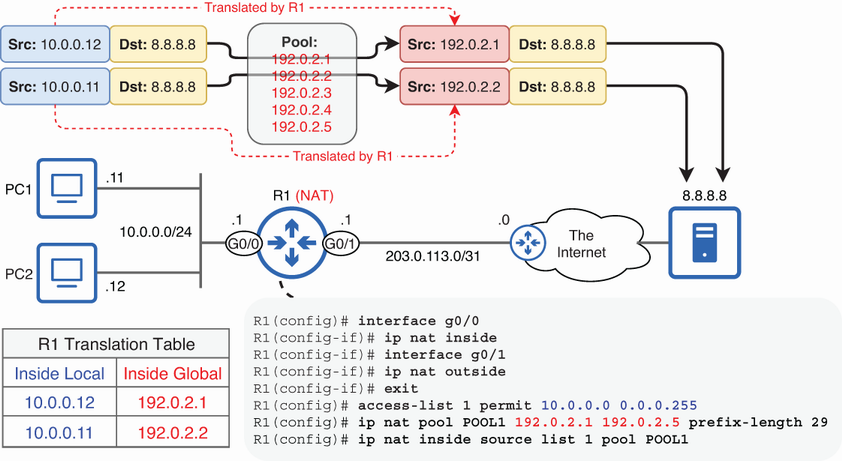
Use the topology to trace how the ACL selects inside local addresses and how the NAT pool supplies inside global addresses. section 9.3.2
Verify active mappings with show ip nat translations. Dynamic entries track communication sessions and can be cleared with clear ip nat translation *. section 9.4
