Dynamic NAT translates inside local private addresses to available inside global public addresses from a configured pool. Unlike static NAT, the router creates mappings as traffic appears rather than configuring each mapping individually. section 9.3.2
Configure dynamic NAT in three steps:
- Use an ACL to identify the inside local addresses eligible for translation. section 9.3.2
- Create a NAT pool containing the available inside global addresses. section 9.3.2
- Map the ACL to the NAT pool, after marking interfaces as inside or outside with ip nat inside or ip nat outside. section 9.3.2
When an eligible host sends traffic, the router assigns an available pool address on a first-come, first-served basis. The ACL selects traffic for translation, not traffic for forwarding. ACL-denied packets pass unchanged; matching packets are dropped when the pool has no available address. section 9.3.2
Cisco IOS configuration and verification
R1(config)# interface g0/0 R1(config-if)# ip nat inside R1(config-if)# interface g0/1 R1(config-if)# ip nat outside R1(config)# access-list 1 permit 10.0.0.0 0.0.0.255 R1(config)# ip nat pool POOL1 192.0.2.1 192.0.2.5 prefix-length 29 R1(config)# ip nat inside source list 1 pool POOL1 Use show ip nat translations to verify dynamically created entries, such as inside local 10.0.0.11 mapped to inside global 192.0.2.2. section 9.3.2
Figure 9.8 Dynamic NAT. An ACL is used to identify a range of inside local addresses, and a NAT pool is used to identify a range of inside global addresses. Addresses in the pool are assigned on a first come, first served basis.
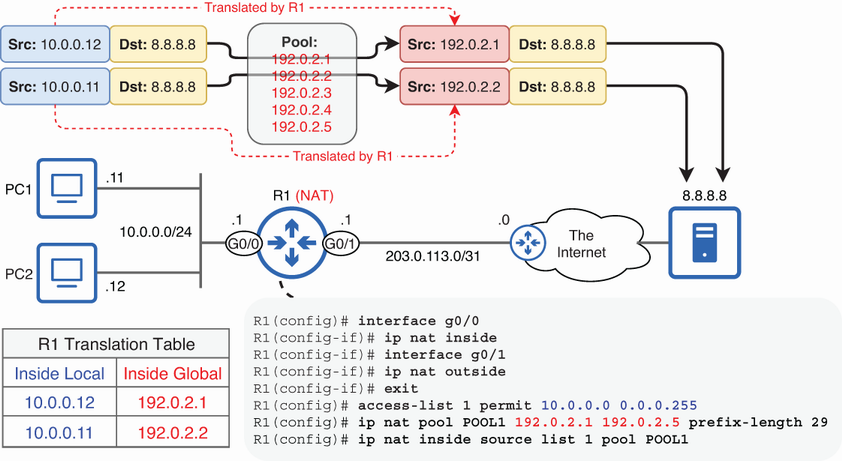
Visualizes the ACL-selected inside local range, the inside global NAT pool, and first-come, first-served address assignment. section 9.3.2
