Static NAT permanently maps each inside local (private) address to one inside global (public) address. It lets selected inside hosts communicate over the internet, including replies translated back to their private addresses. section 9.3.1
Configure and verify static NAT on a Cisco router:
- Mark the interfaces with ip nat inside and ip nat outside. section 9.3.1
- Create each mapping with ip nat inside source static inside-local inside-global. section 9.3.1 section 9.4
- Inspect permanent mappings and session entries with show ip nat translations. section 9.4
Cisco IOS configuration
R1(config)# interface g0/0 R1(config-if)# ip nat inside R1(config-if)# interface g0/1 R1(config-if)# ip nat outside R1(config)# ip nat inside source static 10.0.0.11 192.0.2.1 R1(config)# ip nat inside source static 10.0.0.12 192.0.2.2 These commands map two private hosts to two public addresses. Each inside host requires its own public address; static NAT does not solve IPv4 address exhaustion. section 9.3.1
Figure 9.6 Static NAT. Inside local addresses 10.0.0.11 and 10.0.0.12 are statically mapped to inside global addresses 192.0.2.1 and 192.0.2.2, respectively.
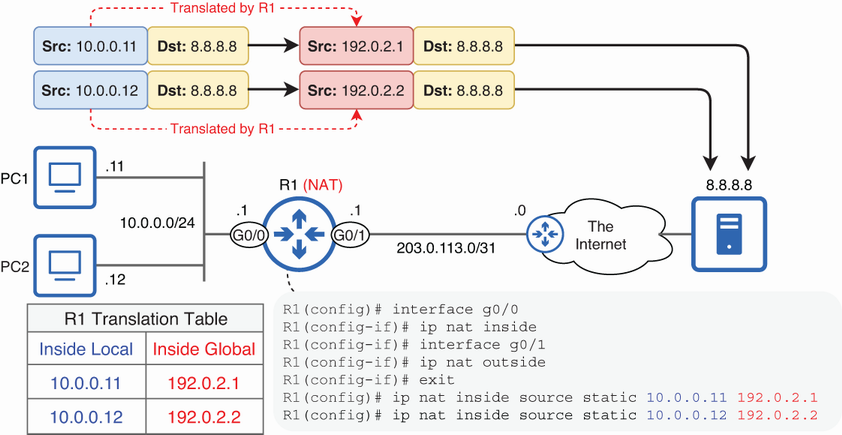
Use the topology figure to trace inside local and inside global addresses for two statically mapped hosts. section 9.3.1
