The .NET command-line interface (CLI) lets you create, build, run, and publish .NET applications from a terminal. It is useful when you prefer an editor other than Visual Studio or work across platforms. Visual Studio provides a graphical interface but largely uses the same commands behind the scenes. section 27.1.1
Create and run a minimal API
In a new folder, run `dotnet new sln -n WebApplication1`, then `dotnet new web -o WebApplication1`, then `dotnet sln add WebApplication1`. The commands create a solution, generate a web project from a template, and add the project to the solution. Change into the project folder and run `dotnet run`; open the URL printed in the terminal to see the app’s “Hello World!” response. section 3.2.1 section 3.3
Common commands in a project folder are:
- `dotnet restore` downloads referenced NuGet packages. Restore normally happens automatically when the project is created. section 3.2.2
- `dotnet build` compiles the project and writes build artifacts to its `bin` folder. section 27.1.1
- `dotnet run` builds as needed and executes the app for local requests. section 3.2.2 section 27.1.1
- `dotnet publish --output publish --configuration Release` prepares output for deployment; a successful build alone does not include everything needed to deploy. section 27.1.1
The dotnet build command runs dotnet restore implicitly. Similarly, dotnet run runs dotnet build and dotnet restore. If you don’t want to run the previous steps automatically, you can use the --no-restore and --no-build flags, as in dotnet build --no-restore.
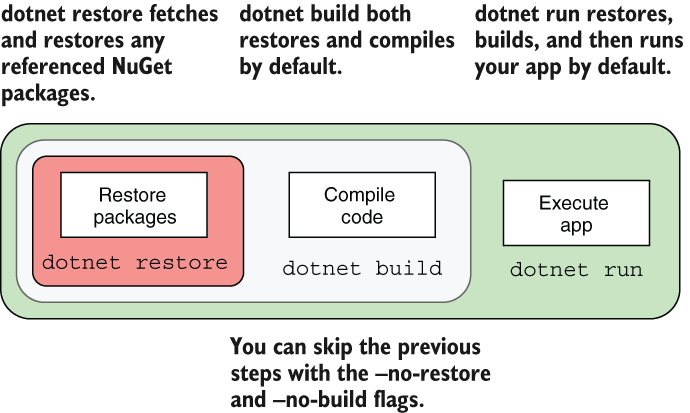
Use the command relationship to see why you usually need not run restore and build separately: build restores implicitly, and run builds and restores implicitly. The `--no-restore` and `--no-build` flags skip those steps when appropriate. section 3.2.2
Templates and tools extend the same workflow. `dotnet new razor` starts a Razor Pages project, while `dotnet new worker` starts a worker service. `dotnet add package Newtonsoft.Json` adds a NuGet dependency. For local API authentication tests, the .NET 7 SDK includes `user-jwts` to generate JWTs; production token issuance commonly uses an identity provider instead. section 13.1.1 section 34.2.1 section 3.5 section 25.4

