A network interface is a connection point through which a device communicates with other network devices. A port usually means the physical connector, while an interface often means its software representation; the terms are frequently interchangeable. section 3.0 section 8.0
Interfaces differ by device role and configuration:
- Router interfaces can receive IP addresses and are disabled by default, so no shutdown enables them. section 8.1
- Switch interfaces forward frames using Layer 2 MAC-address information and normally do not require IP addresses. section 8.1
- Descriptions, speed, duplex, and autonegotiation affect operational interface behavior; shutdown disables unused switch ports as a security practice. section 8.1
Router and switch configuration
A Cisco IOS example configures R1 G0/1 with an IP address, description, manual speed and duplex, while SW1 uses descriptions and speed/duplex settings on selected interfaces and disables unused ports. section 8.1
Figure 8.1 Interface configurations on R1 and SW1: (1) configuring R1’s G0/1 interface with an IP address, description, and manual speed and duplex settings; (2) configuring SW1’s G0/1 interface with a description, and manual speed and duplex settings; (3) configuring SW1’s connections to end-user devices (PCs) using autonegotiation; (4) disabling SW1’s unused interfaces.
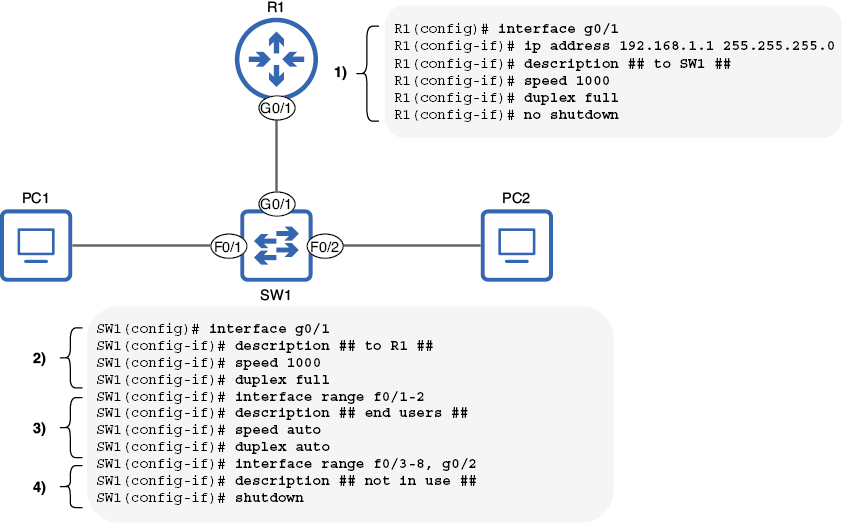
Compare router and switch interface configurations, including IP addressing, manual settings, autonegotiation, and disabled unused ports. section 8.1


