A virtual machine may need SSH or RDP access, but opening a port should not mean welcoming every visitor. An Azure network security group (NSG) filters inbound and outbound traffic to a subnet or a VM’s network interface. Routing determines where traffic goes; the NSG determines whether it may arrive or leave. section 3.3.3 section 4.3
Figure 4.8 NSG1 applies to all VMs in the subnet, but NSG2 only applies to VM4.
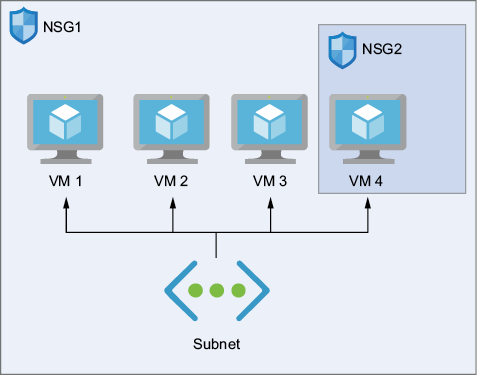
Compare the scope of an NSG assigned to a subnet with one assigned to a single VM’s network interface. Subnet-level placement avoids managing a separate NSG for each VM. section 4.3 section 3.3.3
Each security rule answers three practical questions:
- What traffic matches? Specify its direction, source and destination, port, and protocol. Sources and destinations can include an IP address, a CIDR range, or an Azure service tag. section 4.3
- What happens? Set the action to Allow or Deny. section 4.3
- Which rule wins? Lower priority numbers run first; evaluation stops at the first match. Custom priorities run from 100 to 4,096, while the listed default rules at 65,000–65,002 cannot be removed. section 4.3
Table 4.3 Inbound security rules for a default NSG
| Priority |
Name |
Port |
Protocol |
Source |
Destination |
Action |
| 300 |
|
22 |
TCP |
Any |
Any |
Allow |
| 65000 |
|
Any |
Any |
VNet |
VNet |
Allow |
| 65001 |
|
Any |
Any |
Azure Load Balancer |
Any |
Allow |
| 65002 |
|
Any |
Any |
Any |
Any |
Deny |
Inspect the inbound-rule table: its priority-300 SSH rule allows TCP port 22 from any source, ahead of the default inbound rules. That broad source is worth noticing before using the configuration. section 4.3
Restrict RDP access with Azure PowerShell
Create an NSG with New-AzNetworkSecurityGroup, attach it to a subnet with Set-AzVirtualNetworkSubnetConfig, and save the VNet with Set-AzVirtualNetwork. Then add an inbound TCP rule using Add-AzNetworkSecurityRuleConfig: priority 300, source my.ip.address, destination port 3389, action Allow. Replace the example source-address placeholder with the address that should connect, then save the NSG with Set-AzNetworkSecurityGroup. section 4.3
VM setup offers None, Basic port presets, or Advanced NSG configuration. Basic can get a VM connected, but review its open ports rather than treating a preset as a finished security policy. Azure Bastion is another option for browser-based RDP or SSH without exposing a public IP address. section 3.3.3 section 4.6
