Network throttling deliberately simulates reduced bandwidth, increased latency, dropped packets, and unstable connections so applications can be evaluated under realistic network conditions. section 7.1.1 section 7.3.4
Use throttling before release, not only on fast development WiFi. Compare transfer size, uncompressed resource size, request timing, rendering, interactivity, failures, retries, and request volume against explicit performance budgets. section 7.1.1 section 7.3.4
Article template under Slow 4G
A news article template loads a hero image, social widgets, and comments. With cache disabled and Slow 4G enabled, the waterfall shows 723 kB transferred against 1.9 MB of uncompressed resources, exceeding the 500 kB budget. Three synchronous scripts add about 210 kB and delay interactivity until DOMContentLoaded at 3.57 seconds. Sorting requests by size exposes the largest contributors, while the dependency chain reveals stylesheet and font loading delays. section 7.1.1
Inspect throttled behavior systematically:
- Enable a slow-connection preset, disable the cache, and reload as a first-time visitor. section 7.1.1
- Sort the waterfall by size, then identify synchronous scripts, render-blocking stylesheets, and chained dependencies. section 7.1.1
- Check whether slow responses preserve useful content, whether failures retry or give up, and whether many small requests should be combined. section 7.3.4
- Reproduce constrained conditions on physical devices with Network Link Conditioner, Android Studio Network Profiler, or Charles Proxy. section 7.3.4
Figure 7.2 A network waterfall under Slow 4G throttling. Three synchronous scripts block rendering for over two seconds. The font dependency chain shows how font files cannot begin loading until the CSS that references them has downloaded. The bottom bar reveals the gap between transfer size (723 kB compressed) and resource size (1.9 MB uncompressed).
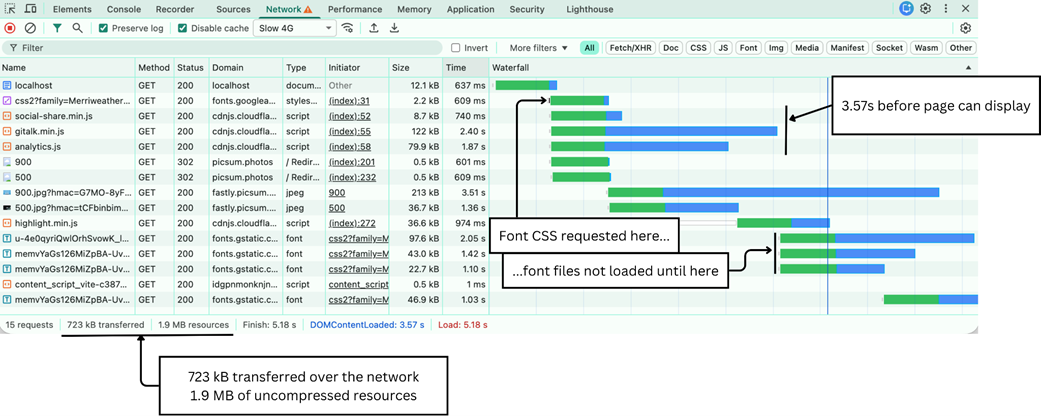
Use the waterfall figure to compare compressed transfer size with uncompressed resource cost and trace blocking scripts and font dependencies. section 7.1.1