Next.js is a React-based full-stack framework for web applications. It keeps React UI components and backend integrations in one project, with built-in support for server-side rendering, static site generation, and production builds. For an AI chat app, that means the interface and the server code that contacts a model provider can share an application structure rather than running as separate React and Express.js projects. section 1.3 section 2.6
A migration from React and Express.js retains the existing React UI while replacing the separate backend and Vite build setup. Next.js supplies an integrated build system and CLI: `next dev` runs the development server, `next build` prepares a production build, and `next start` serves it. Framework choice still depends on project needs and team expertise. section 2.7 section 2.6
Two file conventions connect the browser to the application:
- Pages use file-based routing. A `page.js` file defines a public page at its folder’s URL; for example, `src/app/blog/page.js` maps to `/blog`. A bracketed segment such as `blog/[post]/page.js` captures a URL value for the component’s `params` prop. section 2.8.1
- Backend endpoints use `route.js` or `route.ts` files in route paths. An exported `POST(req)` handles POST requests, can read `await req.json()`, and can return `Response.json({ message })`. This avoids starting a separate Express.js server to relay chat requests to an AI provider. section 2.8.6
Figure 2.9 File-based routing in Next.js. The root page.js in the app corresponds to the index page (/). The blog page.js in the blog folder corresponds to the blog path (/blog). Finally, the route segment that corresponds to individual articles (wrapped in brackets [ ]) corresponds to the blog post path (/blog/hello).
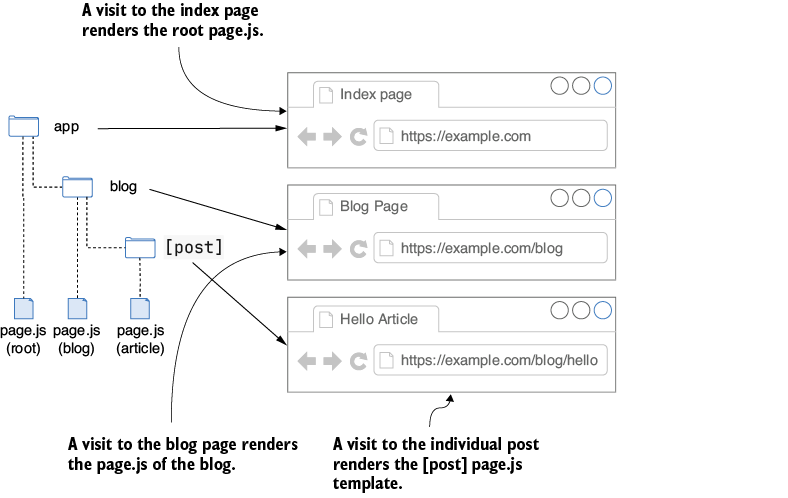
The folder-to-URL diagram makes the distinction between a root page, a nested page, and a dynamic route segment concrete. section 2.8.1
Run a chat app without exposing its model key
With Node.js installed, run `npm run dev -w ch02/chat-client-next` and open `http://localhost:3000`. Put a Gemini key in a local `.env` file as `GEMINI_API_KEY=<SECRET_KEY>` for the default chat page; an OpenAI key enables the `/chat-openai` alternative. Read secrets from `process.env` in server-side code. Reserve the `NEXT_PUBLIC_` prefix for nonsensitive values: prefixed variables are included in browser JavaScript and must not contain API keys. section 2.7.1 section 2.7.2 section 2.8.3
In larger AI applications, Next.js remains the web framework while other tools take specialized roles: the Vercel AI SDK connects AI interactions and streaming to the UI, and LangChain.js can manage document-processing workflows. An interview assistant also pairs it with Redis storage and Clerk.js authentication; a RAG application adds document retrieval and a vector database. When interactions fail, investigate rendering, state management, and performance alongside server-side processing and streaming. section 7.1.2 section 10.1.3 section 11.1.3 section 8.1


