Non-text contrast checks whether meaningful interface components and graphical elements remain distinguishable from their backgrounds. For visualization elements, a 3:1 contrast ratio is the practical AA target. section 4.4.2
Apply the idea with a few visual checks:
- Do not judge a colored shape in isolation; compare it with its background. section 4.4.2
- Account for borders: a dark outline can make a low-contrast bar substantially easier to see. section 4.4.2
- Pair color with form, position, or a label when color carries information. section 4.4.2
A border rescues the bars
Blue bars against light gray measure 1.93:1 and fail the 3:1 target. Adding a dark-gray border raises the border-to-background contrast to 8.7:1. section 4.4.2
Figure 4.34 On the left, the blue bars have no border, so the contrast is calculated between the blue and the light gray as 1.93:1, which is too low to pass WCAG’s AA level of 3:1. However, if you add a dark-gray border, the contrast is then calculated using the border against the background, which shows up better than just the plain blue bars. The contrast between the darker gray border and the lighter gray background is a whopping 8.7:1, beating out the AA level by almost a factor of two.
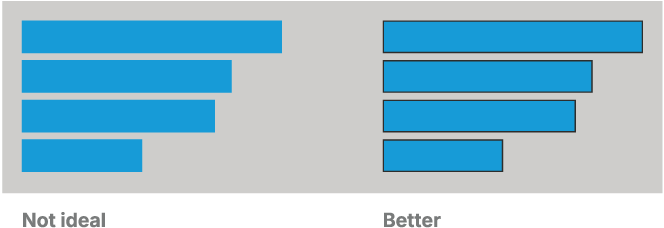
Compare the unbordered and bordered bars to see why the edge of a graphical element can determine whether it remains visible. section 4.4.2
