NTP peering creates a bidirectional relationship between two NTP devices. Each peer exchanges time information with the other and can use that data as an additional reference, improving accuracy, redundancy, and fault tolerance when one peer loses connectivity to its servers. section 2.2 section 2.4
Cisco IOS distinguishes NTP peering from its other operating modes:
- Configure symmetric active mode with ntp peer ip-address on each device, specifying the other peer’s address. section 2.3.2
- Unlike ntp server client/server mode, neither device is solely the time provider; each peer can serve as a time source for the other. section 2.3.2
- Use peering as an additional reference and backup path when a device loses connectivity with its usual NTP servers. section 2.2
- Although supported by Cisco IOS, symmetric active mode is outside the listed CCNA exam topics. section 2.3.2
Configure reciprocal peers
On each device, configure the other device as a peer: R1(config)# ntp peer 10.0.0.2 R2(config)# ntp peer 10.0.0.1 For authenticated peering, configure the same authentication key and trusted-key settings on both devices, then use ntp peer ip-address key key-number. The key number and key value must match or synchronization is refused. section 2.3.2 section 2.3.3
Figure 2.2 The NTP hierarchy. Reference clocks (stratum 0) are high-precision timekeeping devices such as atomic clocks. Stratum 1 NTP servers connect directly and sync to reference clocks. Stratum 2 NTP servers sync to stratum 1 NTP servers. Servers can peer with devices at the same stratum.
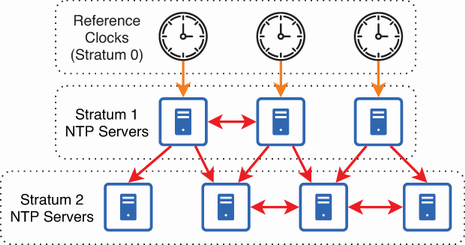
Use the NTP hierarchy figure to relate peering to strata, reference clocks, and the placement of peer devices. section 2.2
