An NTP server supplies synchronized time to network clients or learns time from another source. NTP replaces manual clock configuration, which becomes inaccurate as device clocks drift. Clients send NTP requests over UDP port 123. section 2.2 section 2.4
NTP uses strata to represent distance from a reference clock. Reference clocks are stratum 0; directly connected servers are stratum 1; higher values represent progressively more indirect sources. Stratum 16 is unreliable, and clients do not synchronize to it. section 2.2
Figure 2.2 The NTP hierarchy. Reference clocks (stratum 0) are high-precision timekeeping devices such as atomic clocks. Stratum 1 NTP servers connect directly and sync to reference clocks. Stratum 2 NTP servers sync to stratum 1 NTP servers. Servers can peer with devices at the same stratum.
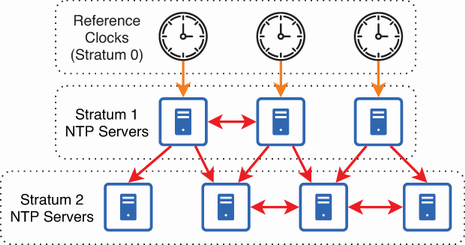
Use the hierarchy to distinguish reference clocks, primary servers, secondary servers, and same-stratum peer relationships. section 2.2
Cisco IOS supports these NTP server roles and configuration patterns:
- Configure client/server mode with ntp server ip-address [prefer]. The device synchronizes to the specified source and can also serve time to its own clients. section 2.3.1 section 2.3.2
- Configure multiple NTP servers for redundancy. The prefer keyword favors one source but does not override factors such as stratum. section 2.3.1 section 2.4
- Use a loopback address as a stable server address, and optionally source NTP messages from that loopback interface with ntp source loopback0. section 2.3.2
- Use ntp master to make the device serve time from its internal clock when it is not an NTP client; an optional stratum value controls the advertised local-clock stratum. section 2.3.2
Configure and verify an NTP client/server
R1(config)# ntp server 216.239.35.0 prefer R1(config)# ntp server 20.43.94.199 R1(config)# do show ntp associations *~216.239.35.0 .GOOG. 1 ... +~20.43.94.199 25.66.230.3 3 ... R1(config)# do show ntp status Clock is synchronized, stratum 2, reference is 216.239.35.0 The asterisk identifies the selected sys.peer; the plus sign identifies a reliable candidate that is not selected. show clock detail should report that the time source is NTP. Synchronization can take 15–20 minutes, although setting the correct time first can accelerate it. section 2.3.1
Protect private NTP deployments with authentication:
- Create and trust a matching key on both devices with ntp authentication-key and ntp trusted-key, then reference it on the client’s ntp server command. section 2.3.3
- Match both the key number and key value; authentication prevents synchronization with an unauthorized or spoofed server. section 2.3.3
