An NTP client obtains time from one or more NTP servers and synchronizes its clock over the network. This replaces manual clock setting, which becomes inaccurate as device clocks drift. NTP requests use UDP port 123. section 2.2 section 2.4
NTP uses a hierarchy. Reference clocks are stratum 0; servers synchronized directly to them are stratum 1, followed by secondary servers at increasing stratum values. Clients generally prefer lower-stratum sources. Stratum 16 is unreliable, and devices do not synchronize to it. section 2.2 section 2.4
Figure 2.2 The NTP hierarchy. Reference clocks (stratum 0) are high-precision timekeeping devices such as atomic clocks. Stratum 1 NTP servers connect directly and sync to reference clocks. Stratum 2 NTP servers sync to stratum 1 NTP servers. Servers can peer with devices at the same stratum.
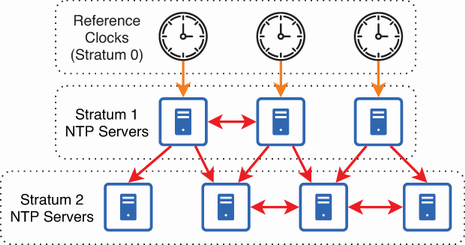
Use the hierarchy to trace how time flows from reference clocks through primary and secondary servers to clients. section 2.2
Configure and verify a Cisco IOS NTP client as follows:
- Enter ntp server ip-address [prefer] for each time source. The optional prefer keyword favors that server but does not override factors such as stratum. section 2.3.1
- Use multiple servers for redundancy, fault tolerance, and improved timekeeping accuracy. A configured device also operates as an NTP server for its own clients. section 2.3.2 section 2.4
- Run show ntp associations to identify the selected sys.peer and candidate sources; run show ntp status to confirm synchronization and the device’s resulting stratum. section 2.3.1 section 2.3.2
- Expect synchronization to take up to 15–20 minutes; manually setting an approximately correct time beforehand can accelerate it. section 2.3.1
Cisco IOS client configuration
R1(config)# ntp server 216.239.35.0 prefer R1(config)# ntp server 20.43.94.199 R1(config)# do show ntp associations *~216.239.35.0 .GOOG. 1 ... +~20.43.94.199 25.66.230.3 3 ... R1(config)# do show ntp status Clock is synchronized, stratum 2, reference is 216.239.35.0 The asterisk marks the current sys.peer, the plus sign marks a reliable candidate, and R1 becomes stratum 2 because its selected server is stratum 1. section 2.3.1
R1(config)# ntp server 216.239.35.0 prefer                                    #1
R1(config)# ntp server 20.43.94.199                                           #1
R1(config)# do show ntp associations
  address       ref clock    st  when  poll reach  delay  offset  disp
*~216.239.35.0  .GOOG.       1   24    64   377 4  0.726  22.840  6.929       #2
+~20.43.94.199  25.66.230.3  3   25    64   377    9.032  24.786  6.720       #3
 * sys.peer, # selected, + candidate, - outlyer, x falseticker, ~ configured
R1(config)# do show clock detail
13:44:32.959 JST Tue Aug 29 2023
Time source is NTP                                                            #4
#1 Configures R1 as an NTP client of two servers, marking one as preferred (optional)
#2 Google’s server is marked as sys.peer.
#3 Microsoft’s server is marked as candidate.
#4 R1’s time source is now NTP.
Inspect the annotated IOS configuration and verification output for preferred-server selection, association states, and NTP time sourcing. section 2.3.1
For a private NTP service, authentication prevents synchronization with an unauthorized or spoofed server. Configure matching keys and trusted-key settings on both devices, then reference the key with ntp server ip-address key key-number. The key number and key value must match. section 2.3.3
Figure 2.6 Configuring NTP authentication between a server and client. This ensures that R2 will only sync its time to R1 and not to a malicious NTP server.
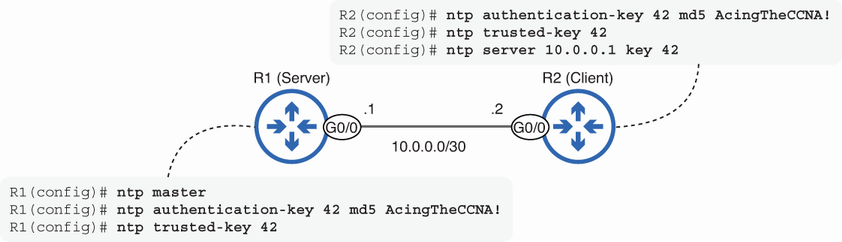
Use the authentication topology to see how a client is restricted to a verified NTP server. section 2.3.3
