OAuth is used to let an app obtain access to protected resources without handling the user’s password. In a .NET MAUI app, the user signs in directly with an identity provider (IDP) in a browser. The IDP then redirects back with a code, which is used to obtain an access token such as a JSON web token (JWT) for API calls. section 8.1.2
OpenID Connect (OIDC) extends OAuth2 for this sign-in flow. An ASP.NET Core IdentityServer instance can act as the OIDC-compliant provider, but a cloud IDP such as Azure Active Directory B2C or Auth0 is also an option. Hosted providers commonly offer supported client packages and can handle work such as secure refresh-token storage. section 8.1.2
A practical OAuth sign-in integration follows these steps:
- Configure the authority, client ID, requested scope, and redirect URI for the OIDC client. section 8.1.2
- Register a custom URL scheme with each target operating system so the browser can route the authentication response back to the app. section 8.1.2
- Use WebAuthenticator through an OidcClient browser implementation to open the provider’s login page and receive the callback result. section 8.1.2
- Call LoginAsync, handle an error result when needed, and retain the returned token response for authenticated requests. section 8.1.2
- Configure a delegating handler to attach the access token as a header on requests made by a named HttpClient. section 8.5
Browser callback in a mobile or desktop app
The app starts authentication by opening the IDP login page. After successful sign-in, the IDP redirects to a URL such as auth.com.mildredsurf.stocktake://callback. On web apps, the redirect normally returns to the originating web address; on mobile and desktop apps, the custom scheme is associated with the installed app. The callback receives the authorization response, allowing the OIDC client to extract and return the JWT. section 8.1.2
Figure 8.3 Step 1: Call the LoginAsync method of the OidcClient package. Step 2: The OidcClient package will call WebAuthenticator and display the login page on IdentityServer. Step 3: The user will log in to IdentityServer. Step 4: IdentityServer returns the result via WebAuthenticator. Step 5: The parsed result is returned to OidcClient. Step 6: OidcClient extracts the JWT from the result and returns it to the caller of the LoginAsync method.
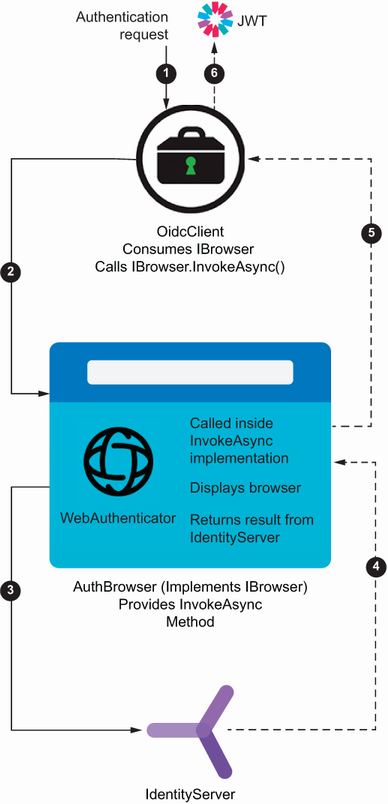
Follow the handoff from LoginAsync to WebAuthenticator, the IDP login page, the callback result, and JWT extraction. section 8.1.2
Keep authentication logic behind an interface and service rather than in the UI. This makes the sign-in behavior reusable and lets the service be registered and injected through the .NET generic host’s services collection. For API access, obtain a configured HttpClient through IHttpClientFactory so token attachment is applied consistently. section 8.5








